Soundwave Generator: Turn Any Audio Into an Image
Soundwave Generator: Turn Any Audio Into an Image
A soundwave generator takes an audio file and draws its sound wave as an image, so you can see a song, a voice or a heartbeat as a shape. Shimga's soundwave generator runs in your browser: upload or record audio, choose one of 12 styles, add text and export a print-ready PNG, JPG, SVG or PDF at up to 24x36 inches and 300 DPI. Designing and previewing are free; a clean download costs $3.99 per design, or less in packs.
Note that "sound wave generator" also means a tone generator that plays a frequency (a test tone at 440 Hz, for example). This article is about the visual kind: tools that turn sound into a picture.
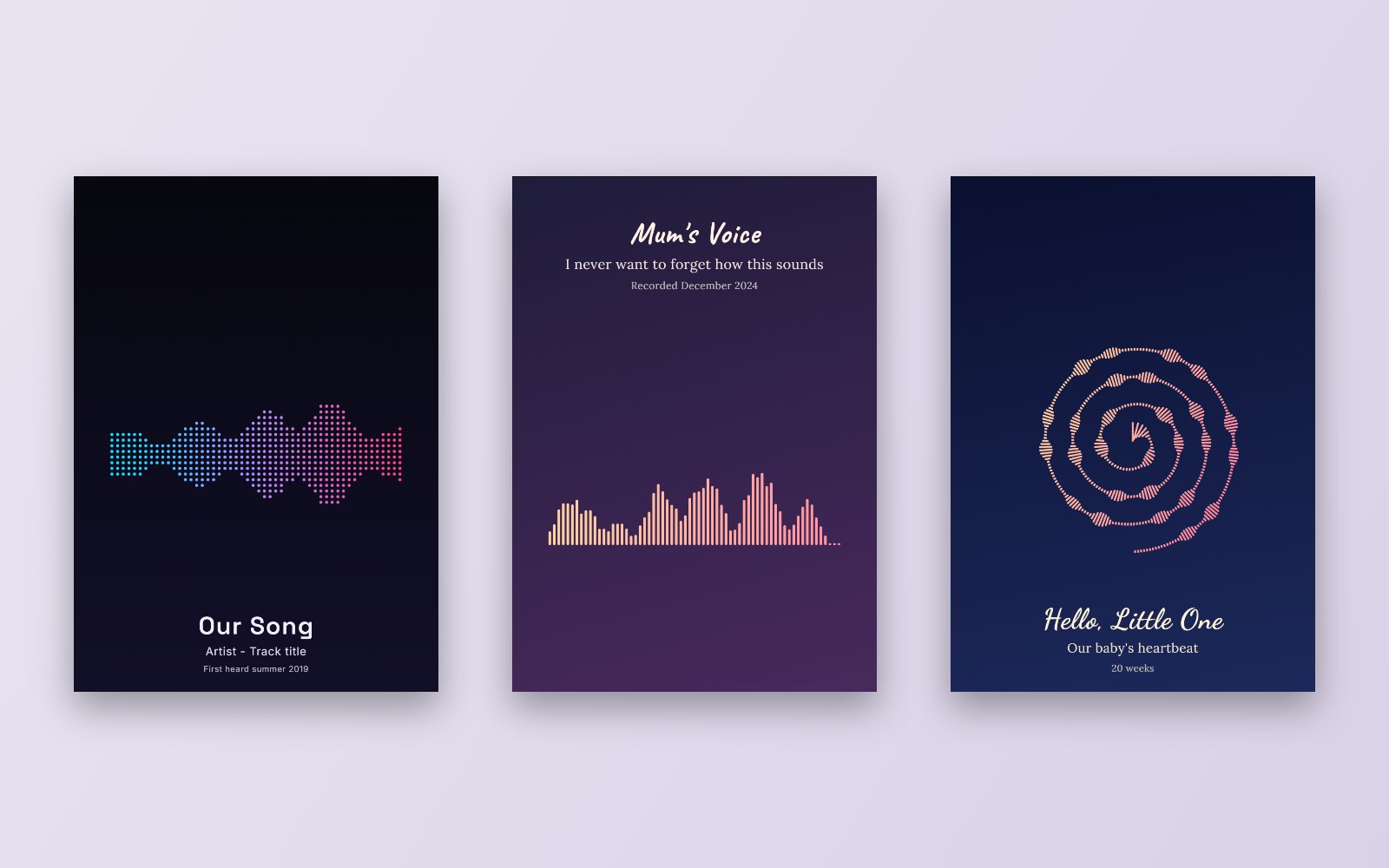 Three designs made in the Shimga editor from example audio: a song, a voice message and a heartbeat.
Key facts
- Input: any common audio file (MP3, WAV, M4A, OGG, AAC, FLAC) or a live microphone recording.
- Processing: in Shimga the audio is decoded in your browser and never uploaded.
- Output: a still image of the waveform, styled as bars, mirrored bars, a line, filled area, dots, a circle, a heart or a spiral, plus four "classic" styles.
- Resolution: 300 DPI print sizes from A4 to 24x36 in, plus square, phone wallpaper and Instagram sizes, or a custom pixel size up to 12000 px.
- Cost: free to design and preview. Downloads: $3.99 one design, $9.99 for three, $24 for ten, $59 for 50 credits, or 10 a month with Shimga Pro (from $5 a month).
How a visual soundwave generator works
- Decode. The tool turns your compressed file into raw samples: tens of thousands of numbers per second describing the movement of the microphone.
- Measure. It splits the clip into small slices and measures the peak or average loudness of each slice.
- Draw. Each slice becomes one bar, dot or point on a line. Loud slices are tall, quiet slices are short.
- Style. Colours, gradients, rounding, spacing and layout turn the raw shape into a design.
That is why the same song always produces the same shape, and why two different voices saying the same words do not.
Make a soundwave image in 6 steps
- Open the Shimga sound wave art generator.
- Add audio. Upload a file, tap Record to use your microphone, or try the Sample.
- Trim. Use Start and End to choose the seconds you want. Shorter clips (5 to 40 seconds) show more detail.
- Choose a style on the Wave tab. Mirrored bars are the most popular look; a line feels minimal; the circle and heart suit square frames.
- Colour and words. Pick a solid colour or gradient for the wave, a background colour, gradient or photo, and add a title, subtitle and date.
- Size and export. Choose your frame size and format. Preview free, then buy the clean download when you are happy.
If you want the long version, the complete sound wave art generator guide explains every option.
What can you make with a soundwave generator?
- Wall art from a first dance, a favourite song or a wedding vow. See the wedding song guide and the favourite song guide.
- Keepsakes from a voicemail or a baby's heartbeat. See voice message and baby heartbeat.
- Social posts at Instagram post (1080 x 1350) or story (1080 x 1920) size.
- Phone wallpaper at 1170 x 2532.
- Tattoo references from a short clip. See the soundwave tattoo guide.
- Podcast quote cards with bold type over mirrored bars. See the podcast quote guide.
 Photo: Jessica Lewis on Pexels
Is there a free soundwave generator?
Short answer: many generators let you design for free, but a clean, full-resolution file usually costs money. Shimga follows that model. You can upload audio, try every style, layout and size, and see a full preview without paying or signing in. When you want the unwatermarked print file, you sign in and buy a design, a pack or use Pro downloads. There is no free download.
If you are comparing tools, check these points before you commit:
| Check | Why it matters |
|---|---|
| Watermark on the paid file? | It should be clean once you pay |
| Max resolution | Print needs about 300 pixels per inch |
| Formats | SVG and PDF help with large prints |
| Where audio is processed | Personal recordings deserve privacy |
| Re-downloads | Can you get another format later? |
In Shimga, once you have bought a design, downloading it again in another format costs nothing extra. Our free vs paid generators guide goes deeper, and the free sound wave art generator page lists exactly what costs nothing.
Tips for a better sound wave image
- Pick a meaningful moment, not the whole file. The chorus, the "I do", the first laugh.
- Avoid long silences at the start and end; trim them so the shape fills the width.
- Raise Amplitude if a quiet recording looks flat, or normalise it first with the loudness normalizer.
- Use Smoothing to soften a noisy recording.
- Keep text short. A title, names and a date are enough.
- Check the print maths on the Size tab before you buy, especially on a phone, which has a lower safe export size than a computer. SVG avoids that limit.
Soundwave generator vs waveform video tools
A soundwave generator makes a still picture. If you want the wave to move with the music, you need a video tool. Shimga has both: the wave-art editor for prints and the Shimga studio for animated visualizer videos. See the sound wave animation generator guide and the existing audio waveform video guide.
FAQ
What is the best free sound wave generator? It depends on what "free" must cover. If you only need to see your sound wave, any browser generator with a free preview works, including Shimga. If you need a clean print file, expect to pay. Shimga's clean downloads start at $3.99.
Can I make a soundwave from a voice recording on my phone? Yes. Open the editor in your phone's browser and either upload the recording or tap Record. The voice recording to artwork guide covers getting files out of messaging apps.
What is the difference between a soundwave creator and a soundwave maker? Nothing important. Soundwave creator, soundwave maker, soundwave image generator and sound waves generator all describe tools that draw audio as a picture.
Can I generate a sound wave from a YouTube link or Spotify? Shimga works from audio files you have the right to use, or from your microphone. It does not fetch audio from streaming links.
Will my sound wave look the same every time? Yes. The same clip with the same settings always draws the same shape. Changing the start and end points changes the shape.
What size should I export? Match your frame. 8x10 or A4 for a desk or shelf, 11x14 to 16x20 for a wall, 18x24 or 24x36 for a statement piece. See best sizes for sound wave prints.
Try it
Open the soundwave generator, drop in a file and see your sound in seconds. When you have a design you love, pick a size and download the clean file.
Last updated: October 2026