Sound Wave Art Generator: The Complete 2026 Guide
Sound Wave Art Generator: The Complete 2026 Guide
A sound wave art generator reads an audio file, measures how loud it is from moment to moment, and draws that loudness as a picture you can print: bars, a line, dots, a circle, a heart or a spiral. You add a song, a voice message, a vow or a heartbeat, choose a style and colours, add a few words, pick a print size and download a high-resolution file. With Shimga you can design and preview in your browser at no cost. A clean, print-ready download is paid, from $3.99 per design.
This guide covers the whole process: what the generator actually draws, how to choose audio, which style suits which recording, sizes and formats, and what you pay.
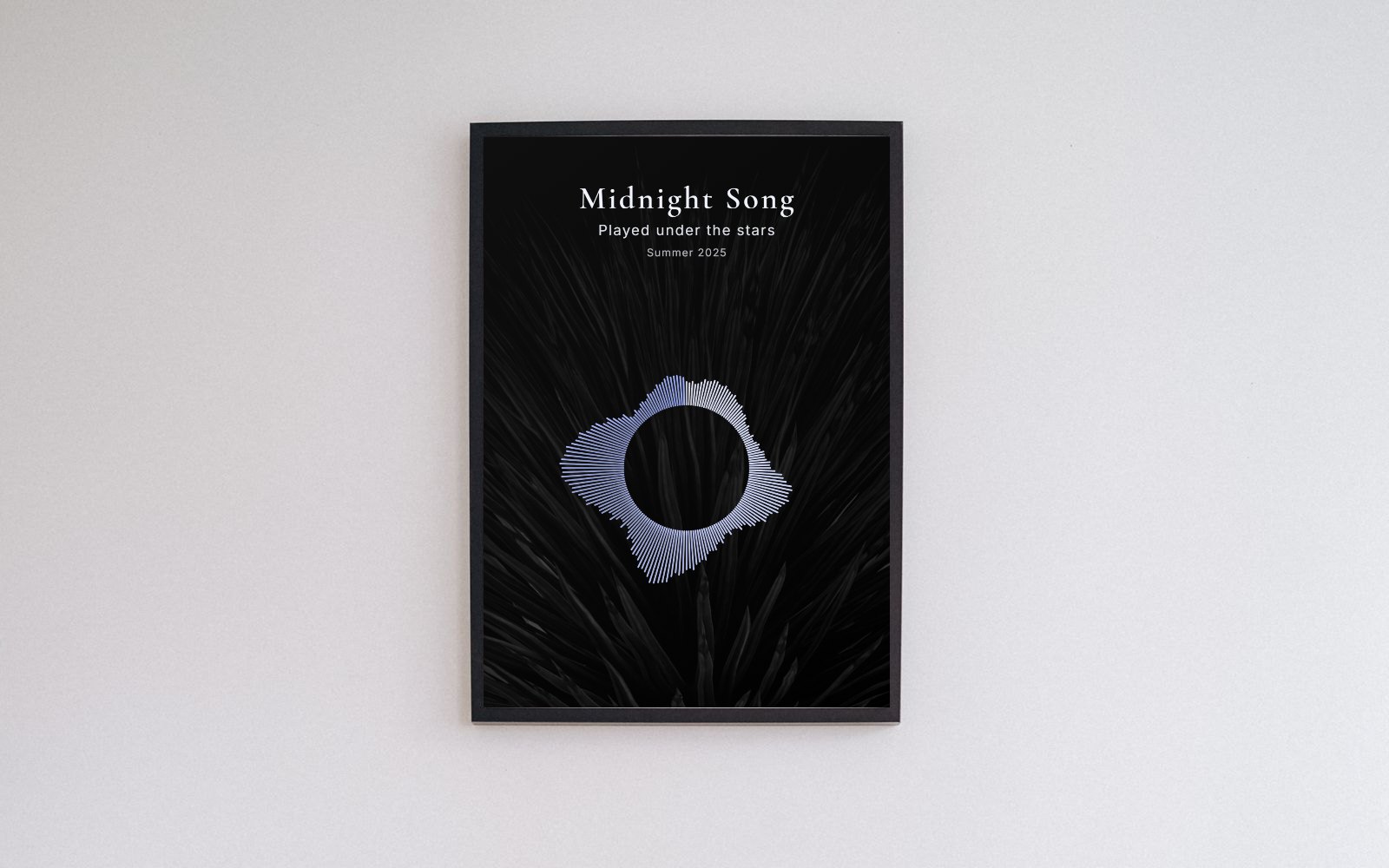 Photo: PNW Production on Pexels. Wave art made in the Shimga editor and placed in the frame.
Key facts
- What it draws: the loudness (amplitude) of your audio over time, not the notes or words.
- Audio in: MP3, WAV, M4A, OGG, AAC or FLAC, or record with your microphone. In Shimga the file is decoded in your browser and is never uploaded.
- Styles: 12 in the Shimga editor: Classic circle, Classic bars, Classic dots, Classic minimal, Bars, Mirrored, Line, Filled, Dots, Circle, Heart and Spiral.
- Print sizes: A4, A3, A2, US Letter, 8x10, 11x14, 12x16, 16x20, 18x24, 24x36 and 12x12 square, all at 300 DPI, plus phone wallpaper and Instagram sizes.
- Formats: PNG, JPG, SVG (vector) and PDF at the physical page size.
- Price: designing and previewing are free. A clean download costs $3.99 for one design, $9.99 for three, $24 for ten or $59 for 50 credits. Shimga Pro (from $5 a month) includes 10 wave-art downloads a month.
What sound wave art really is
Every recording is a list of numbers that describe air pressure, sampled tens of thousands of times a second. Plot those numbers and you get a waveform. Zoomed all the way out, a waveform becomes a loudness outline: tall where the sound is loud, short where it is quiet, flat in silence. That outline is the shape on a sound wave print.
Two recordings never produce the same outline, which is why a print of your first dance or your mum's voicemail feels personal. If you want the science in more depth, read what a waveform is in sound.
Choosing the audio
The audio decides the shape, so it is worth picking well.
- Songs: use the part that matters, usually the chorus or the line you sing along to. Ten to forty seconds gives a detailed shape. A whole song works too, but the detail gets compressed. See how to get the soundwave of a song.
- Voice messages and voicemails: five to thirty seconds of clear speech. Bursts of words with small gaps make a recognisable "talking" pattern. The voice message guide covers getting the file off your phone.
- Heartbeats: a few seconds from a fetal Doppler or a recording from a scan appointment. See the baby heartbeat guide.
- Vows, toasts, a laugh, a podcast line: anything with meaning works. Keep it short and clean.
If the audio is inside a video, extract it first with the video to audio tool. If you want to cut it before designing, the audio trimmer helps, although the editor also lets you choose a segment.
How to make sound wave art in the Shimga editor
- Open the editor at /sound-wave-art-generator/create. A sample sound loads so you can explore straight away.
- Add your sound. Tap Upload to choose a file, Record to use your microphone, or keep the Sample.
- Pick a segment. Drag the Start and End sliders. Only the highlighted part becomes your wave. Press Play segment to hear it.
- Choose a wave style on the Wave tab, then adjust bar width, gap, roundness, amplitude and smoothing. Rotation and a soft shadow are under Effects.
- Set colours. The wave can be a solid colour or a two or three-stop gradient. The background can be solid, a gradient, one of the built-in photos or your own photo, with dim and blur controls.
- Add words. The Text tab has a title, a subtitle and a date or line, with 12 fonts, size, letter spacing and position (top, centre or bottom).
- Or start from a layout. The Layouts tab has occasion layouts (wedding first dance, baby heartbeat, voice of a loved one, anniversary, memorial, birthday and more) and photo layouts. One tap sets style, colours and text, and you keep editing.
- Choose the size on the Size tab, portrait or landscape. The editor shows the pixel dimensions at 300 DPI.
- Export. Pick PNG, JPG, SVG or PDF. Designing and previewing are free; to download, buy a single design, a pack or use your Pro allowance. You sign in to buy, and once you have bought a design, downloading it again in another format costs nothing extra.
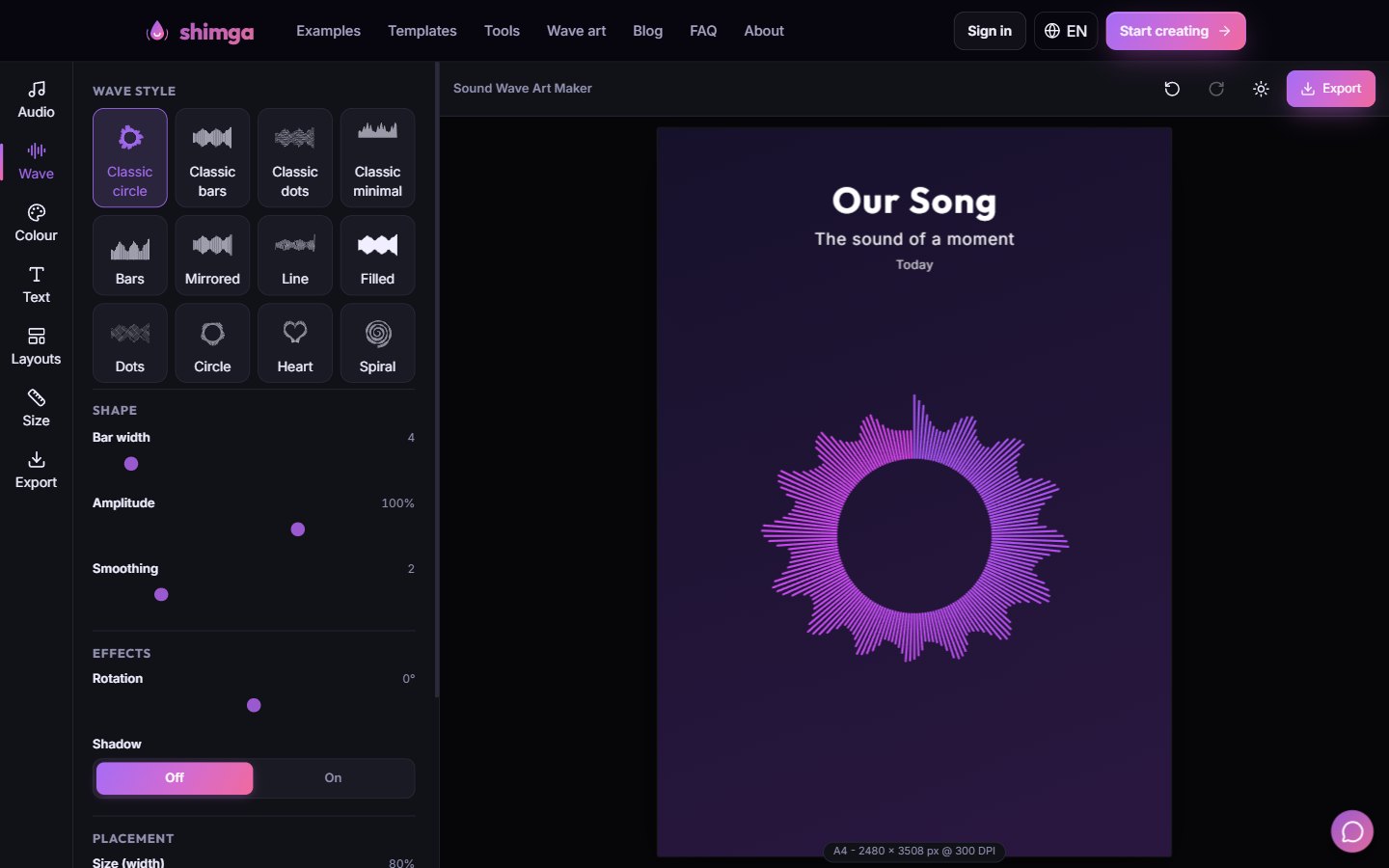 The Wave tab in the Shimga editor, with all 12 styles.
Which style suits which audio
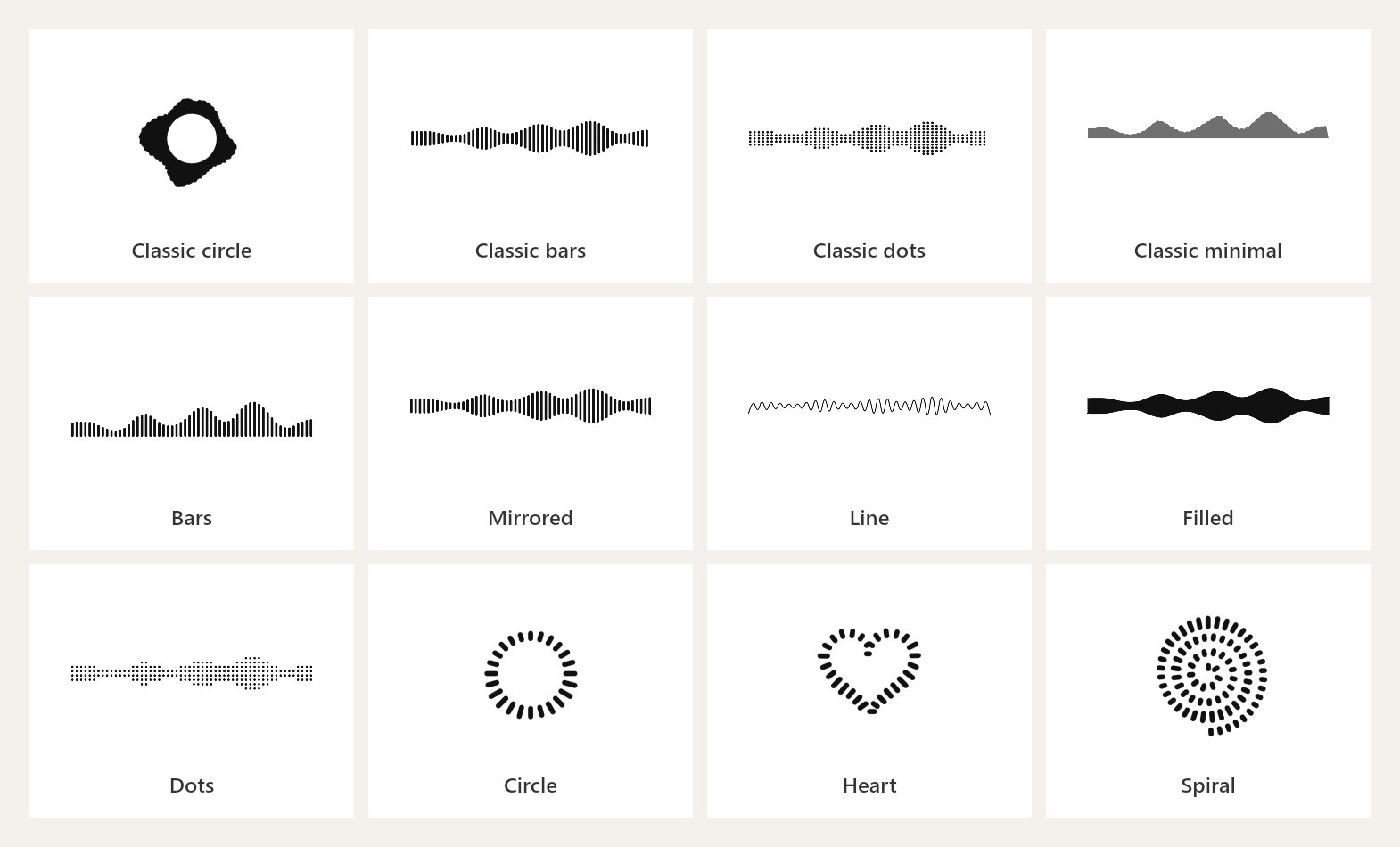 The same 30-second clip in each of the 12 styles, rendered in the Shimga editor.
| Audio | Styles that work well | Why |
|---|---|---|
| Song chorus | Mirrored, Classic bars, Classic circle | Strong beats give a bold, even shape |
| Voice message | Bars, Line, Classic minimal | Shows the rhythm of words and pauses |
| Heartbeat | Line, Spiral, Dots | Regular pulses look gentle and repeating |
| Short phrase or laugh | Circle, Heart | A short clip fills a round shape nicely |
| Podcast quote | Mirrored, Bars | Reads clearly next to bold type |
There is no wrong answer. Try three styles and keep the one you look at longest. For more inspiration see waveform art ideas.
Sizes and print tips
- Match the frame first. Choose the size of the frame you will buy, then design for it. 8x10 and A4 are the easiest to frame; 16x20 and 18x24 suit a living room.
- 300 DPI is built in. An A4 print exports at 2480 x 3508 pixels; 24x36 is 7200 x 10800. Phones have a lower safe limit, so very large sizes may be capped on mobile. SVG has no limit, so choose SVG for poster sizes if your print shop accepts it.
- Use matte or satin paper. Gloss can hide thin lines under glare.
- Leave a margin. Keep the wave away from the edge, or use a mat in the frame.
- Deepen neon colours. Paper is duller than a screen.
Our best sizes for sound wave prints guide has a full table, and the sound wave print guide covers paper and framing.
What it costs
Designing, previewing, trying every style and layout: free. Downloading the clean, unwatermarked file: paid.
| Option | Price | Best for |
|---|---|---|
| Single design | $3.99 | One gift |
| 3 designs | $9.99 | A couple of gifts or a small set |
| 10 designs | $24 | A family project or a small shop |
| 50 credits | $59 | Regular makers |
| Shimga Pro | from $5/month | 10 wave-art downloads a month, plus studio features |
Credits are valid for a year. There is no free download, so preview as much as you like and buy once you are happy. For a wider look at pricing models across tools, read free vs paid sound wave art generators.
FAQ
Is there a free sound wave art generator? Many tools let you design for free. In Shimga, designing and previewing are free in your browser, and a clean print-ready download starts at $3.99. The free sound wave art generator page explains exactly what is free.
How do I make soundwave art from a song? Upload the song, pick the 10 to 40 seconds you love most, choose a style, add the title and a date, then export at your frame size. The steps above walk through it.
Can I record my voice directly? Yes. Tap Record in the Audio tab and allow microphone access. The recording stays in your browser.
What file should I send to a print shop? A PDF or JPG at the print size is the safest choice. SVG is ideal when the shop accepts vector files, because it scales to any size.
Is my audio uploaded anywhere? No. The editor decodes the audio in your browser to draw the waveform. Read more about privacy and local processing.
Can I make a video of my sound wave instead? Yes, with a different tool. The Shimga studio makes animated music visualizer videos. See the sound wave animation generator guide.
Start designing
Open the sound wave art generator, add your sound and try a few styles. Browse the occasion guides for weddings, anniversaries, birthdays and memorials, or the gift ideas list.
Last updated: October 2026