Sound Wave Animation Generator: Make a Waveform Video
Sound Wave Animation Generator: Make a Waveform Video
A sound wave animation generator turns audio into a video where the waveform moves in time with the sound. You add a song, voice note or podcast clip, choose a visualizer (bars, a waveform line, a circular spectrum), set the background and text, and export an MP4. Shimga has two separate tools for this: the sound wave art editor makes still prints, and Shimga Studio makes animated visualizer videos in your browser.
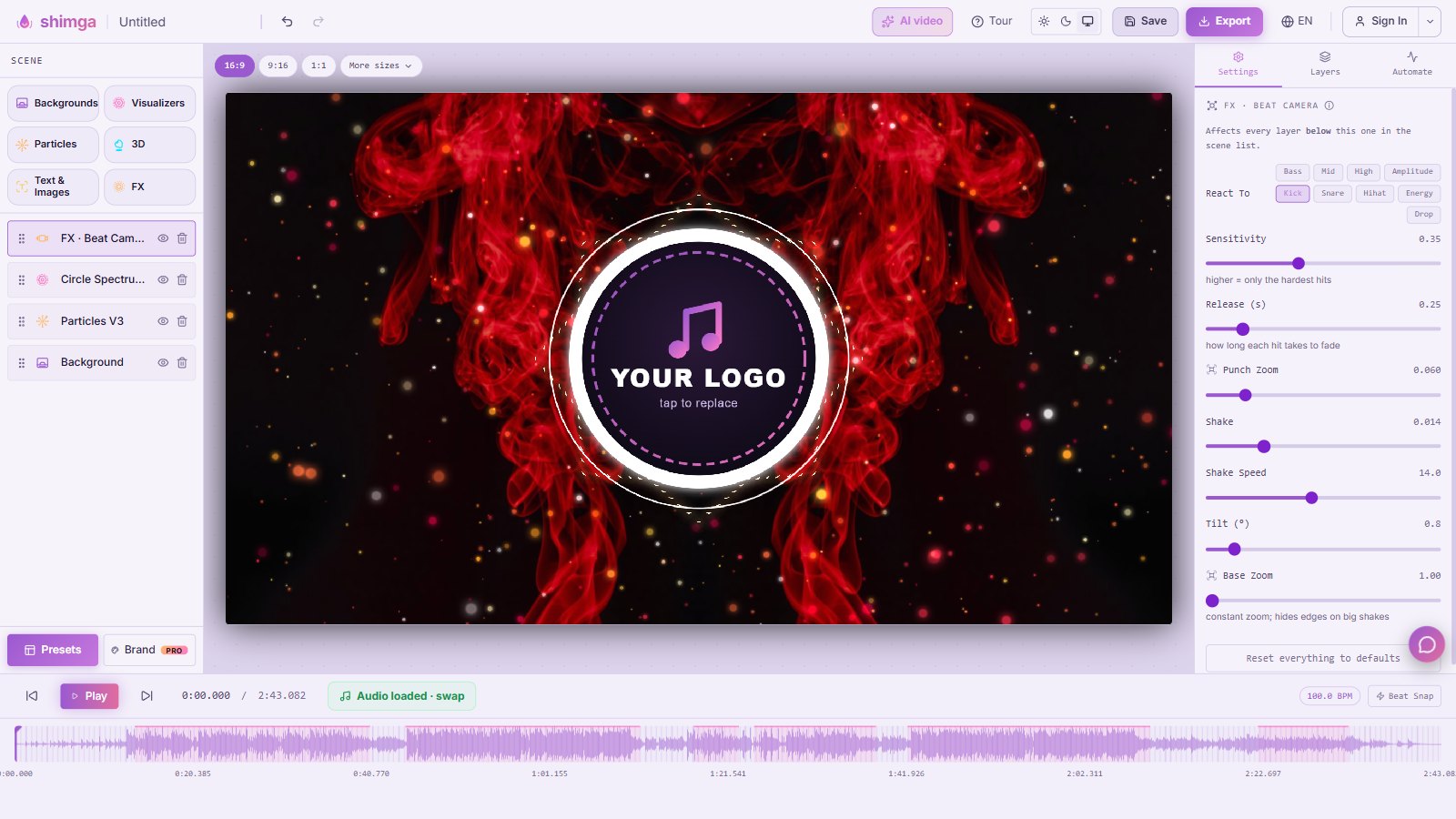 Shimga Studio, the browser editor for animated sound wave and visualizer videos.
Key facts
- Still or moving? A print shows one fixed shape of a clip. An animation shows the wave reacting to each moment of the audio.
- Where to make it: Shimga Studio at /studio, in a desktop or mobile browser, with no install.
- Aspect ratios: 16:9 for YouTube, 9:16 for Shorts, Reels, TikTok and Spotify Canvas, 1:1 for feeds, plus more sizes.
- Export: MP4. Building and previewing need no account; exporting needs a quick sign-in.
- Pro: standard exports at up to 1080p and 30 fps, up to five minutes, without Pro elements do not need Pro. 2K, 4K, 60 fps, longer videos and Pro-only elements need Shimga Pro (from $5 a month).
Print or video: which do you need?
| You want | Use | Output |
|---|---|---|
| Wall art, a gift, a keepsake | Wave art editor | PNG, JPG, SVG, PDF at print sizes |
| A post or Reel with moving sound | Shimga Studio | MP4 video |
| A podcast audiogram | Studio | MP4 with waveform and captions or title |
| Both | Make both from the same audio | One print, one video |
Many people do both: a framed print of the first dance and a 15-second animated clip for social media.
How to make an animated sound wave video in Shimga Studio
- Open Shimga Studio. Pick a preset from the start dialog or close it to begin with the default scene.
- Add your audio. Use the audio control in the timeline to load your song or recording. The timeline shows its waveform.
- Choose the size. Click 16:9, 9:16, 1:1 or More sizes above the preview.
- Pick a visualizer. Open Visualizers in the Scene panel and add bars, a waveform or a circular spectrum. Each layer has its own colours and settings.
- Set the background. Add a colour, image or animated background from Backgrounds, and optional Particles or FX such as a beat camera.
- Add text. Song title, artist, episode name or a quote via Text & Images.
- Preview with Play and adjust how strongly the visuals react.
- Export the MP4. Sign in when asked. The export dialog lists any Pro items in your scene so you can remove them or upgrade.
For step-by-step platform guides, see make a music visualizer video for YouTube, podcast audio visualizer and how to make a Spotify Canvas.
 Photo: Thomas Lineweaver on Pexels
Sizes for waveform videos
| Platform | Aspect ratio | Common size |
|---|---|---|
| YouTube | 16:9 | 1920 x 1080 |
| YouTube Shorts, TikTok, Reels | 9:16 | 1080 x 1920 |
| Instagram or Facebook feed | 1:1 or 4:5 | 1080 x 1080 |
| Spotify Canvas | 9:16 | 3 to 8-second loop |
Our aspect ratio guide covers each platform in detail.
Which animated style suits which audio?
- Music with a strong beat: a circular spectrum or bars reacting to the bass. See audio reactive visuals.
- Speech and podcasts: a simple waveform line or mirrored bars with large, readable text.
- Calm or acoustic music: a thin line, slow particles and soft colours.
- Voice notes for social posts: a short clip, a photo background and the words as text.
If you want to understand why visuals react differently to bass and treble, read audio frequency reactivity.
Tips for better waveform videos
- Keep it short for social: 15 to 60 seconds of the best part.
- Make text readable on a phone: large size, high contrast, away from the edges.
- Use one main visual. A single strong waveform beats five competing layers.
- Check the first second. Viewers decide quickly; start on a strong moment.
- Match your print. Reuse the colours from your sound wave print so the video and the wall art feel like a set.
Common mistakes with waveform videos
- Using the whole song for a social clip. Most platforms reward short, strong moments. Trim to the hook.
- Tiny text. What looks fine on a laptop disappears on a phone. Preview at phone size.
- Too many effects. Particles, shake and glow at once can hide the waveform, which is the point of the video.
- Wrong aspect ratio. A 16:9 video posted to Reels gets letterboxed. Pick the ratio for the platform first.
- Quiet audio. A quiet track makes a timid visualizer. Normalise it first with the loudness normalizer.
Can you animate a sound wave print?
The wave-art editor makes still images, so you cannot export a print design as a video. The quickest way to get a matching animation is to recreate it in Studio with the same audio segment, similar colours and the same text. Trim the audio first with the audio trimmer so both use exactly the same seconds.
FAQ
What is the best sound wave animation generator? It depends on the output. For an MP4 that reacts to music in a browser, Shimga Studio is one option; we compare others in best music visualizer 2026. For a still print, use a sound wave art generator instead.
Is there a free soundwave video generator? In Shimga Studio you can build and preview without paying. Standard exports (up to 1080p, 30 fps and five minutes, without Pro elements) do not need Pro but do need a sign-in. Higher settings and Pro elements need Shimga Pro.
Can I make a waveform video from a voice recording? Yes. Load the recording into Studio, add a waveform visualizer and a title, and export. The podcast visualizer guide uses the same approach.
Will my video have a watermark? No. Video exports from the Shimga studio never carry a watermark. Scenes that use Pro elements need Shimga Pro or export credits to export.
What format does the video export in? MP4, which works on YouTube, Instagram, TikTok and most other platforms.
Can I turn the same audio into a print too? Yes. Open the sound wave art generator, load the same file and pick the same seconds. See the complete guide.
Get started
For motion, open Shimga Studio. For a still print, open the wave art editor. Same audio, two keepsakes.
Last updated: October 2026