How to Get the Soundwave of a Song (and Print It)
How to Get the Soundwave of a Song (and Print It)
To get the soundwave of a song, you need an audio file of the song, a tool that draws its waveform, and a decision about which part to draw. Load the file into a sound wave generator, select the chorus or the line that matters (10 to 40 seconds usually looks best), choose a style, and export an image. In Shimga that takes a few minutes in your browser: previews are free, and a clean print-ready download costs $3.99.
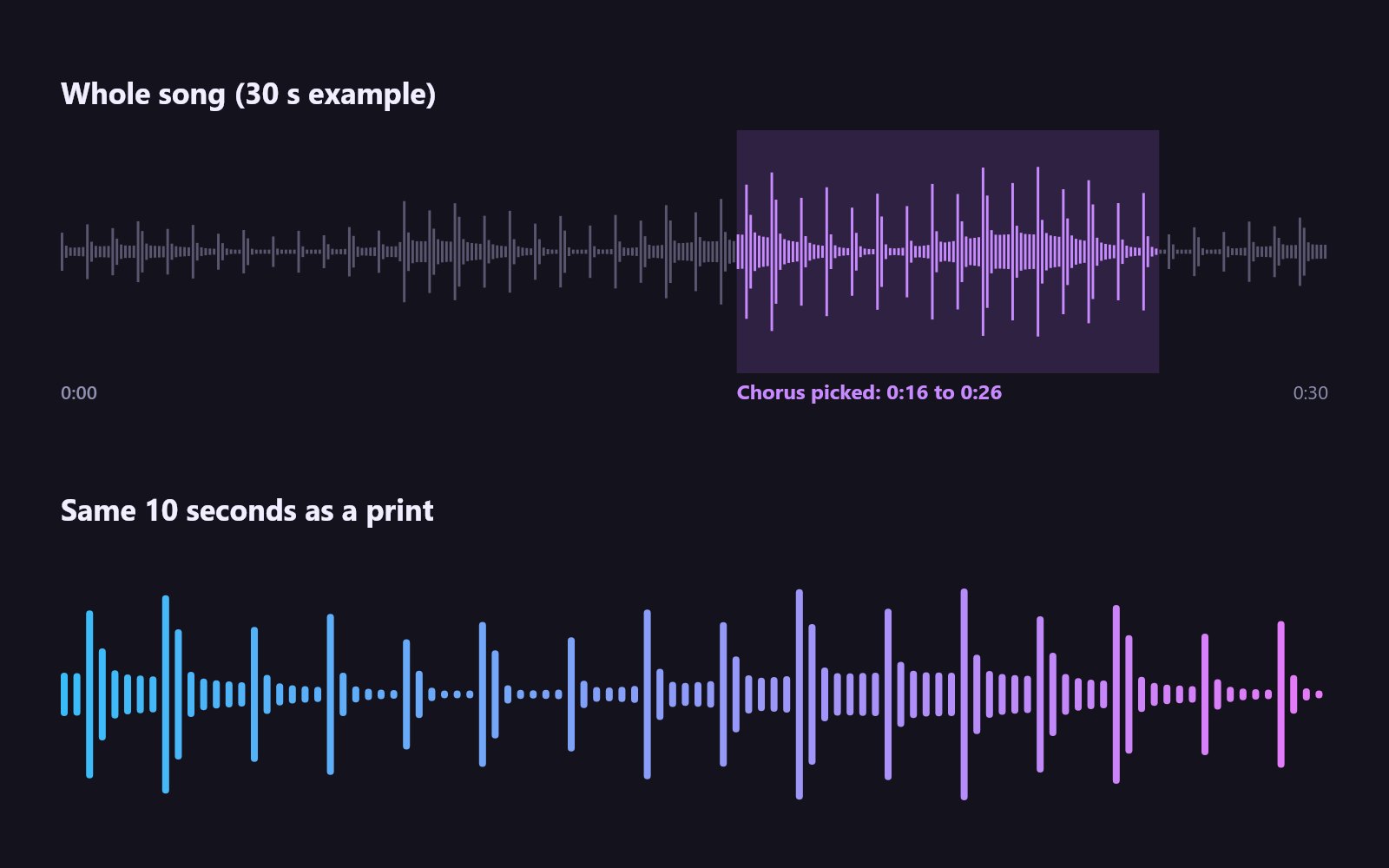 Pick a section, then draw it. Diagram rendered from an example audio file.
Key facts
- Every song has a unique soundwave, because the waveform is a record of its loudness over time.
- You need the audio file. Streaming links cannot be loaded directly; use a file you own, such as a purchased download, a CD rip or your own recording.
- Shorter is clearer. A full three-minute song squeezes detail; a 10 to 40-second section shows beats and phrasing.
- Same clip, same shape. The same section always draws the same waveform.
- Output: PNG, JPG, SVG or PDF at A4 to 24x36 in, 300 DPI.
Step 1: Get a usable audio file
Common sources:
- Music you bought as a download (MP3, AAC/M4A, FLAC or WAV).
- CDs ripped to MP3 or FLAC with your computer.
- Your own recording, such as a live performance, a band demo or someone singing at a wedding.
- Your own release, if you are the artist.
- A video you made of the song being performed. Extract the sound with the video to audio tool.
Streaming apps encrypt their audio, so you cannot load a Spotify or Apple Music track directly into a browser tool. The Shimga editor works from files and microphone recordings.
Step 2: Pick the right part of the song
 Photo: Сергей Жаров on Pexels
Ask what the print is about.
- First dance or "our song": the chorus, or the line you both sing.
- Favourite song: the hook, the drop or the first ten seconds you would recognise anywhere.
- Memorial: the part the person always sang along to.
- Your own track: the hook, or the intro if it is iconic.
Good sections have contrast: loud and quiet parts, a beat, a pause. A wall of constant noise draws a flat block.
Step 3: Draw the soundwave in Shimga
- Open the sound wave art generator.
- Tap Upload and select the song file. It is decoded in your browser, not uploaded.
- In Pick a segment, drag Start and End. The small overview shows the whole song so you can spot the loud chorus. Press Play segment to check.
- On the Wave tab choose a style. For songs, Mirrored, Classic bars and Classic circle look strongest.
- Adjust Amplitude if the peaks look clipped or flat, and Smoothing for a softer outline.
- On Colour, set a gradient and background, or a photo background. On Text, add the song title, artist, names and date.
- Choose a frame size on Size and check the pixel dimensions.
- Preview free. Download the clean PNG, JPG, SVG or PDF from $3.99.
The Our favourite song layout (neon dots on midnight) and Wedding first dance layout (gold bars on ivory) are quick starting points.
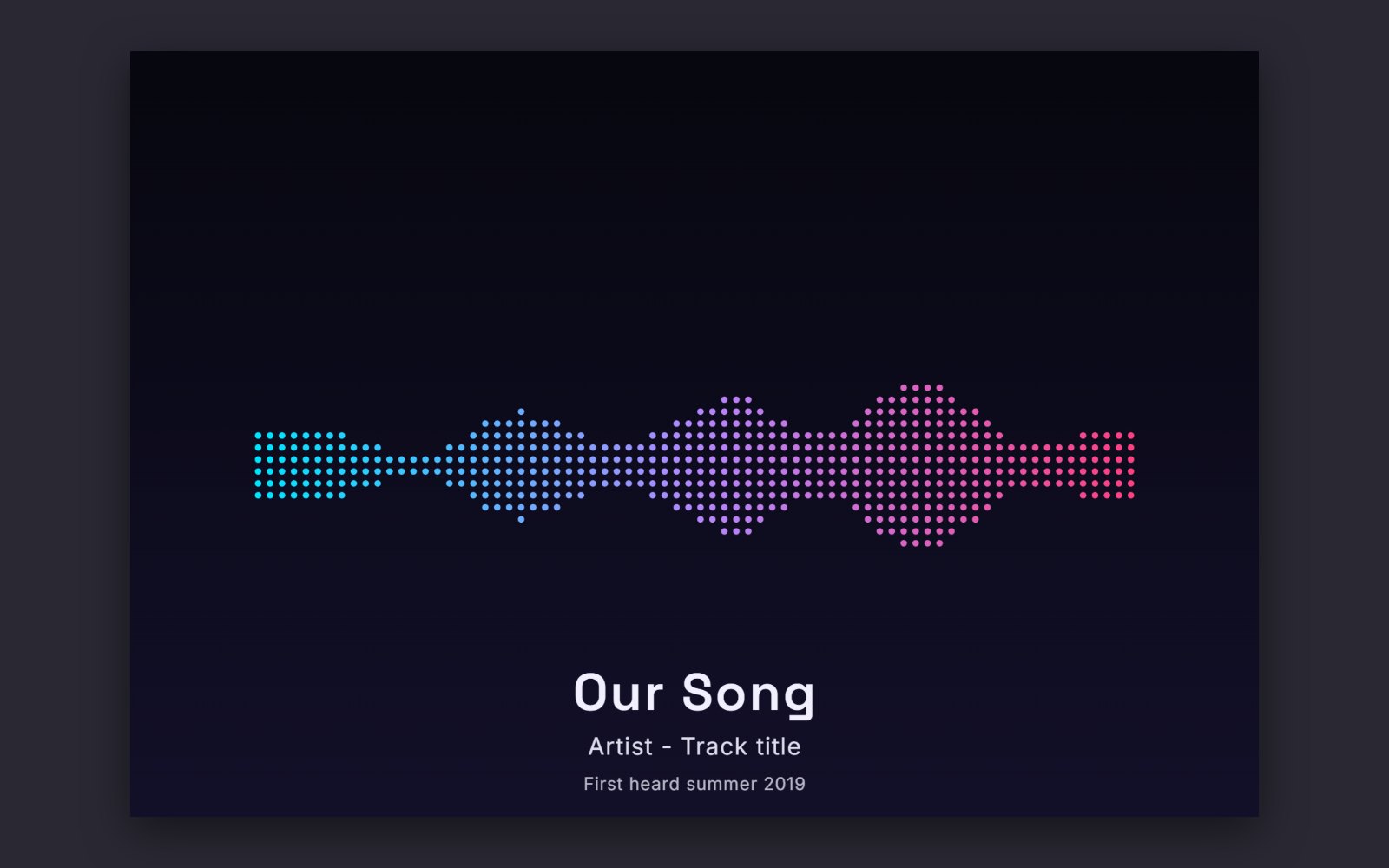 A landscape design made in the Shimga editor with the "Our favourite song" layout and example audio.
Whole song or a section?
| Choice | Looks like | Best for |
|---|---|---|
| 5 to 15 seconds | Big, bold individual beats | Small prints, circle and heart styles |
| 15 to 40 seconds | Clear rhythm and phrasing | Most prints |
| Full song | A dense band with louder choruses | Large landscape prints over a sofa or bed |
If you go for the whole song, choose a landscape size such as 24x36 in landscape or 18x24 in landscape, so there is room for detail.
Troubleshooting a song waveform
The shape is a solid block. Modern masters are often very loud all the way through, so the waveform has little contrast. Choose a section with a breakdown or a pause, lower Amplitude slightly, or pick a style with gaps such as Dots or Bars with a wider Gap.
The peaks are cut off at the top. Lower Amplitude on the Wave tab until the tallest bars fit with a little room.
The intro is silent. Move Start to the first sound. A long flat line at the beginning wastes space.
It looks too busy. Shorten the segment or increase Bar width so there are fewer, bolder bars.
The file will not load. Convert it to MP3 or WAV and try again. Files from streaming apps are protected and will not open.
Copyright: what you can and cannot do
Making a print of a song's waveform for your own wall or as a personal gift is how most people use these tools. Selling prints of someone else's song is different: the waveform comes from a copyrighted recording, and song titles and lyrics can be protected too. If you want to sell, use your own music or get permission. This is general information, not legal advice.
Print tips
- Match the frame first, then design. 11x14 or A3 is the most common size for a song print.
- Use matte or satin paper.
- Deepen neon colours for print; screens are brighter than paper.
- Keep the text small and the wave as the hero.
See best sizes for sound wave prints and the sound wave print guide.
FAQ
How do I find the soundwave of a song? Load the song file into a sound wave generator. It reads the audio and draws its waveform. In Shimga, upload the file and the waveform appears immediately.
Can I get the soundwave of a song on Spotify? Not directly from the stream. Use a file you own or have permission to use, such as a purchased download.
Does every song have a different soundwave? Yes. Two different recordings never produce exactly the same waveform, and even two versions of the same song differ.
Which part of a song looks best as wall art? Usually the chorus: it is loud, rhythmic and meaningful. A 10 to 40-second section gives a clear shape.
Can I add the lyrics? You can add a title, subtitle and one more line of text, which is enough for a short lyric. Long lyrics compete with the wave and can raise copyright questions.
Is the song uploaded to Shimga? No. The editor decodes it in your browser to draw the wave.
Make your song print
Find the file, pick the moment and open the editor. For more ideas see the favourite song guide and the wedding song guide.
Last updated: October 2026