Best Free Audio Visualizer Online (No Watermark)
Best Free Audio Visualizer Online (No Watermark)
The best free audio visualizer online is one that exports a clean MP4 with no watermark, at the resolution you need, without making you sign up first. As of October 2026, two browser tools meet all three: Shimga and Vizzy. Specterr has a free tier too, but it adds a watermark and caps exports at 720p.
This guide compares the free options side by side, explains the catches that only show up at export time, and walks through making a video in a few minutes.
 Photo: Alina Vilchenko on Pexels
Quick answer
- Best free online visualizer with no watermark and no account: Shimga. Standard exports up to 4K at 60 fps, up to 5 minutes long, no sign-in (as of October 2026).
- Also free with no watermark: Vizzy. Its own FAQ says you can make as many videos as you want, and the site is funded by ads and donations.
- Free, but watermarked: Specterr's free plan (720p 30 fps, up to 5 minutes, watermark, videos expire after 10 days).
- Need a plugin inside your DAW instead? See audio visualizer plugins for FL Studio and other DAWs.
- Want a print, not a video? Use the sound wave art generator.
What "free" should mean for a visualizer
Almost every visualizer lets you build a project for free. The differences show up when you press export. Before you spend an hour on a design, check these five things:
- Watermark. Is there a logo burned into the video? A watermark on a YouTube upload or a Spotify Canvas is hard to hide.
- Resolution and frame rate. 720p at 30 fps looks soft on a big screen. 1080p at 60 fps is a sensible minimum for YouTube.
- Length. Many free tiers stop at a few minutes. Fine for a single, not enough for a DJ mix or a podcast episode.
- Account. Some tools ask you to sign up before you can export. That is not a deal-breaker, but it is worth knowing.
- Where it renders. Browser tools that render on your own computer are fast to start but depend on your hardware. Cloud renderers work on weak laptops but usually meter exports.
Free online audio visualizers compared (October 2026)
Facts below come from each tool's own website, checked on 27 October 2026. Plans change, so check the source before you commit.
| Tool | Free watermark? | Free max quality | Free length | Account to export? | Source |
|---|---|---|---|---|---|
| Shimga | No | Up to 4K, 60 fps | Up to 5 min (longer is Pro) | No | shimga.app |
| Vizzy | No ("No watermarks") | "Up to 4K", "Up to 60 FPS" | Browser memory limits apply | Check vizzy.io | vizzy.io FAQ and home page |
| Specterr (Free plan) | Yes | 720p, 30 fps | 5 min, 1 video per day | Free plan sign-up | specterr.com/pricing |
A few notes on the table:
- Vizzy states in its FAQ that "you can create as many videos/projects as you want" and that it is "funded by ad revenue and donations". Its FAQ also lists browser limits, such as a 4 GB (or 2 GB) file size cap with its WebAssembly encoder.
- Specterr's free plan lists "Watermark on videos", "Medium quality audio" and "Videos expire in 10 days". Paid plans remove the watermark (Pro is listed at $198 billed yearly, as of October 2026). We go deeper in is Vizzy or Specterr free? Pricing compared.
- Shimga's free tier covers every resolution up to 4K and every frame rate up to 60 fps. Pro (Monthly $5, Yearly $48, or a one-time Lifetime plan) unlocks Pro elements, Pro templates and videos longer than 5 minutes. Free terms can change, so treat this as "as of October 2026".
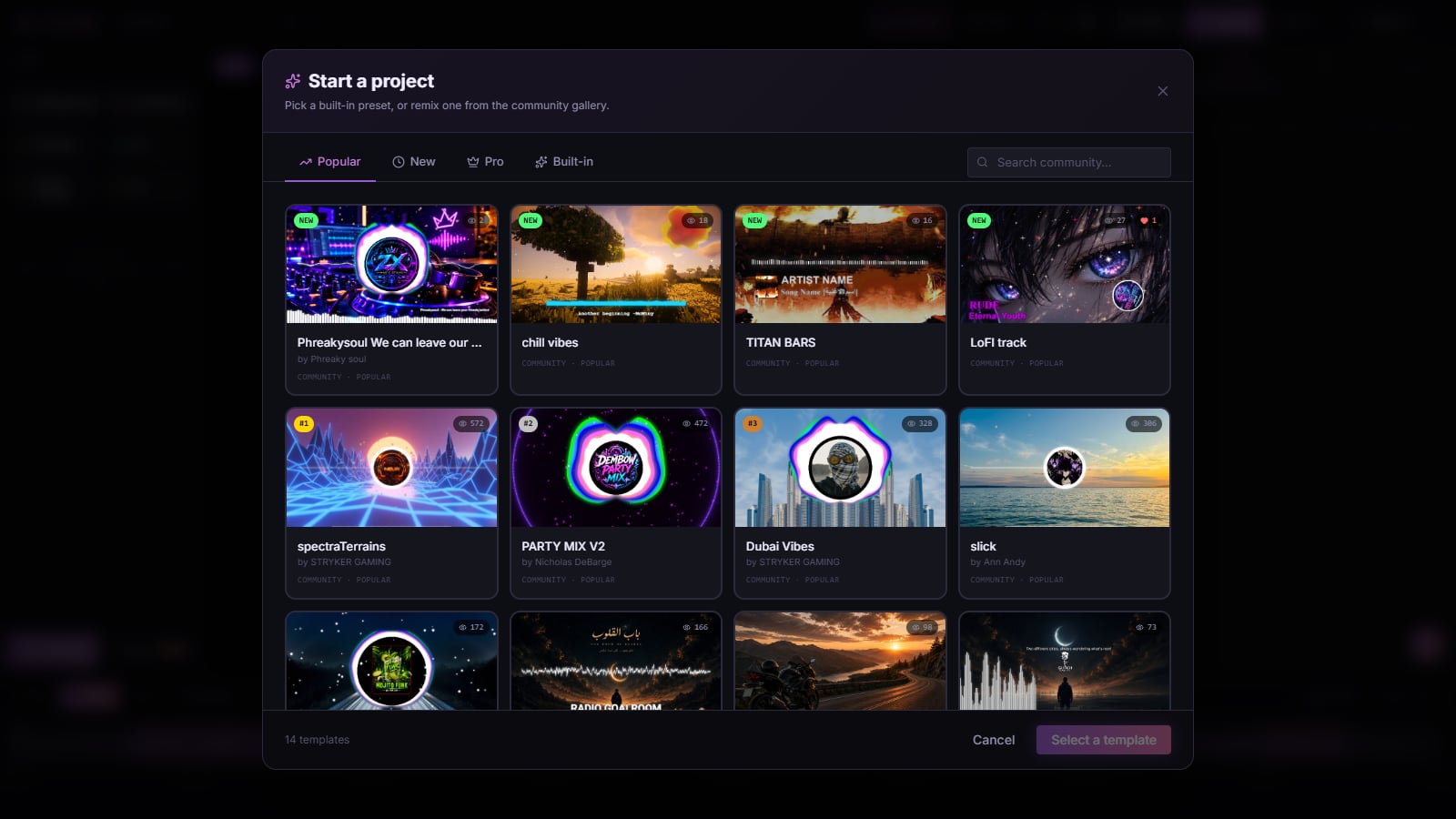 Screenshot: the Shimga studio's template picker, October 2026
How to make a free visualizer video with Shimga
You do not need an account for any of these steps.
- Open the studio. Go to shimga.app/studio. Nothing installs.
- Pick a starting point. Choose a built-in preset or a community design from Templates. There are 16 new templates to start from.
- Add your song. MP3, WAV, OGG, FLAC and M4A all work. Audio is analysed in your browser, so the file is not uploaded unless you choose to publish a public template.
- Make it yours. Change colours, swap the background, add your cover art, artist name and logo. Every layer reacts to the beat. Add the Time element if you want a progress bar or a running clock.
- Choose a format. 16:9 for YouTube, 9:16 for Shorts, Reels, TikTok and Spotify Canvas, 1:1 for the Instagram feed.
- Export an MP4. Pick resolution and frame rate, then export. Keep the tab open while it renders.
If your laptop struggles with 4K, render at 1080p first. YouTube still serves 1080p cleanly, and it exports much faster. Our 1080p and 4K export guide covers the trade-offs.
Which free visualizer should you pick?
- You want a polished YouTube visualizer today, at no cost: Shimga or Vizzy. Try the same song in both and keep the one whose style you like.
- Your computer is old or very slow: a cloud renderer such as Specterr may be easier, even with the 720p and watermark limits on its free plan. Or export a short test in a browser tool first to see how your machine copes.
- You make a lot of vertical content: check that the tool exports 9:16 natively rather than cropping a 16:9 video. Shimga and Vizzy both list portrait, landscape and square formats.
- You want a podcast video, not a music video: a dedicated podcast visualizer layout with a title and waveform reads better than a club-style spectrum.
- You want visuals inside your DAW while producing: that is a plugin job, not a browser job. See audio visualizer VST alternatives.
 Photo: Beyzaa on Pexels
Red flags in "free" visualizers
- The watermark only appears in the export. Preview looks clean, the download does not. Export a 10-second test before you design for an hour.
- Expiring downloads. If a free plan deletes videos after a few days, download straight away.
- Audio quality drops on free. Some tools re-encode audio at lower quality on free tiers. Listen to the export on good headphones.
- Unclear rights. You need the rights to the song and to every image you use. A visualizer tool cannot give you rights to someone else's music.
Is a free visualizer good enough for YouTube?
Yes, if it exports at least 1080p with clean audio and no watermark. YouTube does not treat a visualizer made with a free tool any differently from one made with paid software. What matters is the music, the thumbnail and whether the visual suits the track. For channel tips, read audio visualizer for YouTubers and make a music visualizer video for YouTube.
FAQ
What is the best free audio visualizer online?
As of October 2026, Shimga and Vizzy both export without a watermark at up to 4K and 60 fps in the browser. Shimga does not need an account for standard exports up to 5 minutes. Try both with the same song and keep the style you prefer.
Is there a free music visualizer with no watermark?
Yes. Shimga's studio video exports have no watermark, and Vizzy's site advertises "No watermarks". Specterr's free plan does add a watermark.
Can I use an audio visualizer without an account?
Yes. In Shimga you can open the studio, add a song and export a standard MP4 without signing in. You only need an account to save templates to the cloud, sync projects or buy Pro.
Is there a free alternative to Specterr?
Shimga and Vizzy are both free browser alternatives without a watermark. Specterr's strength is cloud rendering, which helps on slow computers.
What is the best free visualizer for a music video?
For a full-length 16:9 YouTube video, a browser studio with layers (background, spectrum, cover art, text) works best. Start from a template so you are not designing from a blank canvas.
Will free visualizers stay free?
Nobody can promise that. Plans change, which is why every price in this article is dated. Shimga's free tier currently covers up to 4K/60 fps exports up to 5 minutes; check the Pro section for current terms.
Do I need a powerful computer?
Browser visualizers render on your own device, so a faster computer exports faster. Most laptops from the last few years handle 1080p fine. See faster previews and exports.
Related reads
- Best music visualizer 2026: how to choose
- Free vs paid audio visualizers
- Types of audio visualizers explained
- Music visualizer with no watermark: what to check
Last updated: October 2026. Competitor details were checked on their official websites on 27 October 2026.