Best Music Visualizer 2026: How to Choose
Update, 20 November 2026: Shimga's free exports now go up to 720p at 30 fps with a small "Made with shimga.app" watermark, and Pro elements and templates are included. 1080p to 4K, 60 fps, exports without the watermark and videos over 5 minutes need Shimga Pro or credits. Where this article mentions free 4K or no watermark, it describes the earlier free tier.
Short answer: The best music visualizer depends on how you work. For customisable music videos made in a browser, Shimga is built for that: you can build, preview and export without paying, exports have no watermark, and 2K and 4K are currently free. Template tools suit quick videos, podcast tools suit audiograms, and desktop VJ software suits live shows.
Last updated 21 October 2026.
The music visualizer space changed in 2025 and 2026. WebGL2 and WebCodecs made it possible to render high-resolution video inside a browser tab, so tools that render locally now sit alongside cloud services and desktop software. Rather than rank tools with scores we cannot back up, this guide groups them by what they are good at and tells you what to verify before you choose. Plans and prices change; always confirm on each tool's own site.
Photo: Teddy Yang on Pexels
What should you compare when choosing a music visualizer?
Use the same short test on every tool: load one 3-minute song, build a simple neon waveform on a dark background, and note the following.
- Export time and where the video is rendered (your computer or a cloud queue).
- Watermark: is there one on the export you would actually publish?
- Maximum resolution on the plan you would use.
- Customisation depth: can you decide what reacts to bass, mids or highs?
- Formats: 16:9, 9:16 and 1:1, and MP4 output.
- Privacy: does your audio get uploaded?
Which music visualizers are worth considering?
| Tool | Type | Good for |
|---|---|---|
| Shimga | Browser studio, renders locally | Customisable music videos, vertical and square formats |
| Specterr | Browser, cloud rendering | Beginners who like template editing |
| Vizzy | Browser, template-first | Quick template-led videos |
| Renderforest | Broad video platform | People who also need intros and other video assets |
| Headliner | Audiogram tool | Podcasters making social clips |
| Cloud render services | Cloud | Chromebooks or computers with weak graphics |
| After Effects with plugins | Desktop editor | Motion designers who already own the software |
Shimga: for customisable browser-based music videos
Shimga Studio renders in your browser using your own graphics hardware. At 1080p a render is often around the length of the song, and your audio stays on your device. It supports shader and 3D backgrounds, particles, spectrums, waveforms, logos, text and synced lyrics, and any numeric setting can be linked to the bass, mids, highs or overall level. You can build, preview and export without paying or signing in. Exports up to 5 minutes are currently free up to 720p at 30 fps with a small watermark (Pro elements included); Pro goes up to 4K at 60 fps with no watermark. Longer videos, Pro elements and Pro templates need Pro, which is $5 per month or $48 per year with a 7-day free trial, $3 for 6 Pro exports, or $131 + tax for Lifetime. It needs a modern browser; Chrome and Edge are best.
Try it with your own song
Build and preview in your browser before deciding anything.
Open Shimga Studio →Specterr and Vizzy: template-led browser tools
Both offer polished templates and a quick path to a finished video. Specterr renders in the cloud, which spares your computer but can mean waiting in a queue at busy times; Vizzy encodes the video in your browser. Specterr has free and paid plans and Vizzy is free (funded by ads and donations); limits change, so check specterr.com and vizzy.io for current watermark and resolution terms. Our full comparisons: Shimga vs Specterr and Shimga vs Vizzy.
Renderforest and Headliner: broader or specialised
Renderforest is a general video platform with a visualizer category among many templates; it makes sense if you want a full marketing toolkit, and is more than you need if you only want music videos. Headliner focuses on audiogram-style podcast videos with captions, which suits podcasters more than musicians.
Cloud render services
If you are on a Chromebook or your graphics hardware is weak, a paid cloud service that renders for you can be the practical choice. The trade-offs are cost and uploading your audio.
After Effects with plugins
If you already own After Effects and a visualizer plugin, you have extremely deep control. It also means a subscription, paid plugins and a steep learning curve, which is unrealistic for most musicians.
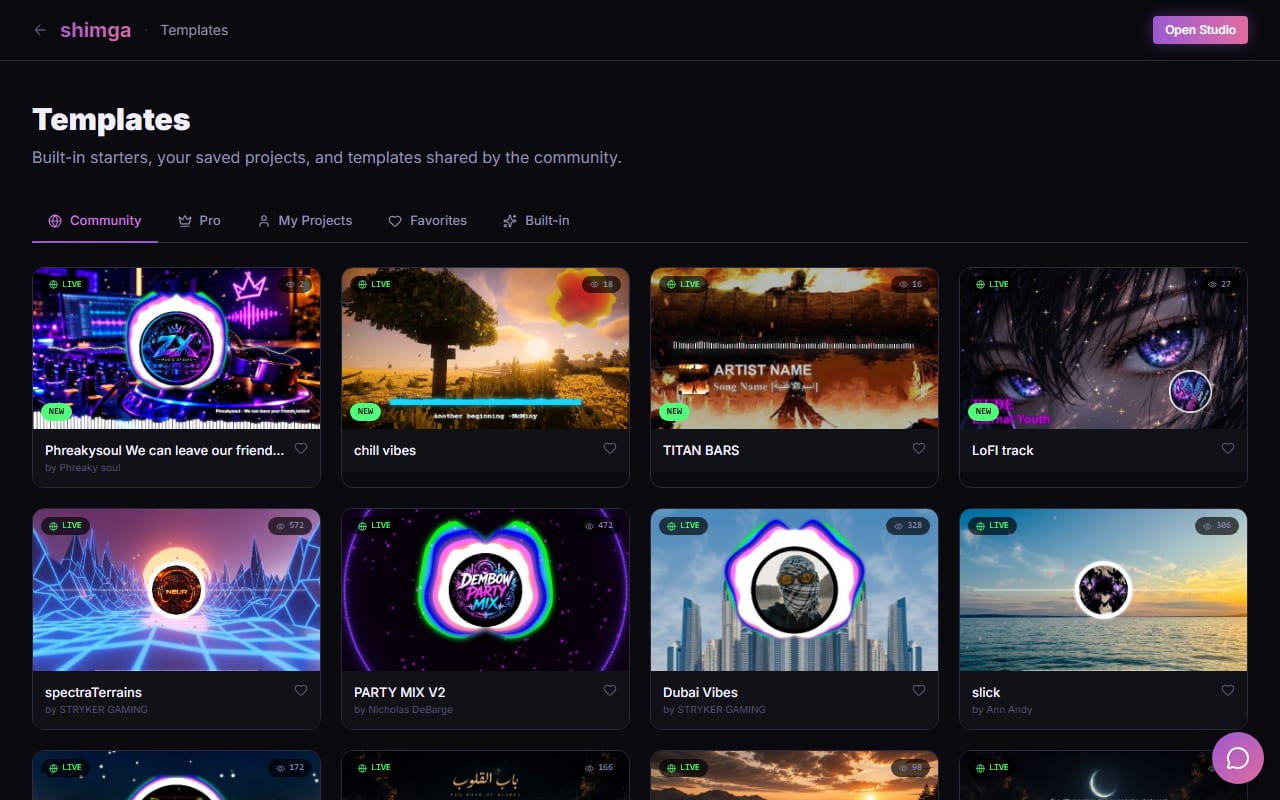
Screenshot: shimga.app
How do you choose?
Render speed and hardware
Local rendering starts immediately and scales with your computer; cloud rendering depends on the service's load but does not use your machine. Neither is better in every case. Test with your own song and computer.
Watermarks
This is the most common surprise with entry-level plans. Check the exact output you would publish before you invest time in a scene. In Shimga the rule is explicit: exports have no watermark, and a scene with Pro elements needs Pro or has those elements removed.
Customisation or simplicity
If you want presets with minimal tweaking, a template tool works. If you want to decide how each element responds to the music, choose a layered editor with per-band linking and keyframes. See audio frequencies and reactivity.
Which tool fits which job?
- Customisable music video in a browser: Shimga.
- Quick template video: Specterr or Vizzy.
- Podcast clips with captions: Headliner, or Shimga's waveform presets for a simple look.
- Marketing videos with many asset types: Renderforest.
- Weak computer: a cloud render service.
- Working motion designer: After Effects with plugins.
Frequently asked questions
What is the best music visualizer in 2026?
It depends on your workflow. For customisable, browser-based music videos with local rendering, Shimga is built for that; for quick template videos, Specterr or Vizzy; for podcast clips, Headliner.
Does Shimga have a watermark?
No. Shimga does not add a watermark. Exports up to 5 minutes are currently free up to 720p at 30 fps with a small watermark (Pro elements included); Pro goes up to 4K at 60 fps with no watermark.
Can a browser visualizer export 4K?
Yes. Shimga exports 2K and 4K in the browser, currently free for scenes without Pro features. Speed depends on your hardware.
Do I need a powerful computer?
Not for 1080p on a recent laptop, but higher resolutions and complex scenes render faster on better graphics hardware. Cloud tools avoid this at the cost of a queue and uploading your audio.
Test it yourself
Use the same song in two tools and compare previews and exports.
Open Shimga Studio →
Photo: FOERDER ZONE on Pexels