Is Vizzy Free? A Vizzy Alternative Compared
Update, 20 November 2026: Shimga's free exports now go up to 720p at 30 fps with a small "Made with shimga.app" watermark, and Pro elements and templates are included. 1080p to 4K, 60 fps, exports without the watermark and videos over 5 minutes need Shimga Pro or credits. Where this article mentions free 4K or no watermark, it describes the earlier free tier.
Short answer: Yes. As of 11 November 2026, vizzy.io says you can make as many videos as you want, with no watermark, at up to 4K and 60 FPS; it is funded by ads and donations. Shimga is a Vizzy alternative that also renders on your own computer: you can build, preview and export without paying or signing in, and standard exports are currently free up to 4K at 60 fps with no watermark.
Last updated 11 November 2026.
Vizzy is one of the best-known browser music visualizers, so it is natural to ask two things before you commit a song to it: is Vizzy free, and is there a Vizzy alternative that fits your workflow better? This page answers both, explains what to look at in any visualizer's plan before you render, and walks through what Shimga does differently.
Photo: Pavel Danilyuk on Pexels
Is Vizzy free?
Yes. Vizzy's FAQ answers "Is it really free?" with "Yes, you can create as many videos/projects as you want", and says the site is funded by ad revenue and donations. Its home page lists "No watermarks", "Up to 4K" and "Up to 60 FPS". Its FAQ also lists some limits: with its WebAssembly encoder, exports cannot be larger than 4 GB (2 GB without the File System API), and files and non-public projects are cleaned up after 3 months without activity. We checked this on 11 November 2026; terms can change, so check vizzy.io before you start a project.
What should you check in any visualizer's plan?
Whichever tool you use, these five details decide whether an entry-level plan works for a real release:
- Watermark: is a logo burned into the export?
- Resolution: is the plan capped at 720p or 1080p, or can you export higher?
- Export limits: how many videos per day or month?
- Length: will a full song, a DJ mix or a podcast episode fit?
- Formats: can you make vertical 9:16 videos for TikTok, Reels and Shorts?
What does the Vizzy alternative, Shimga, offer?
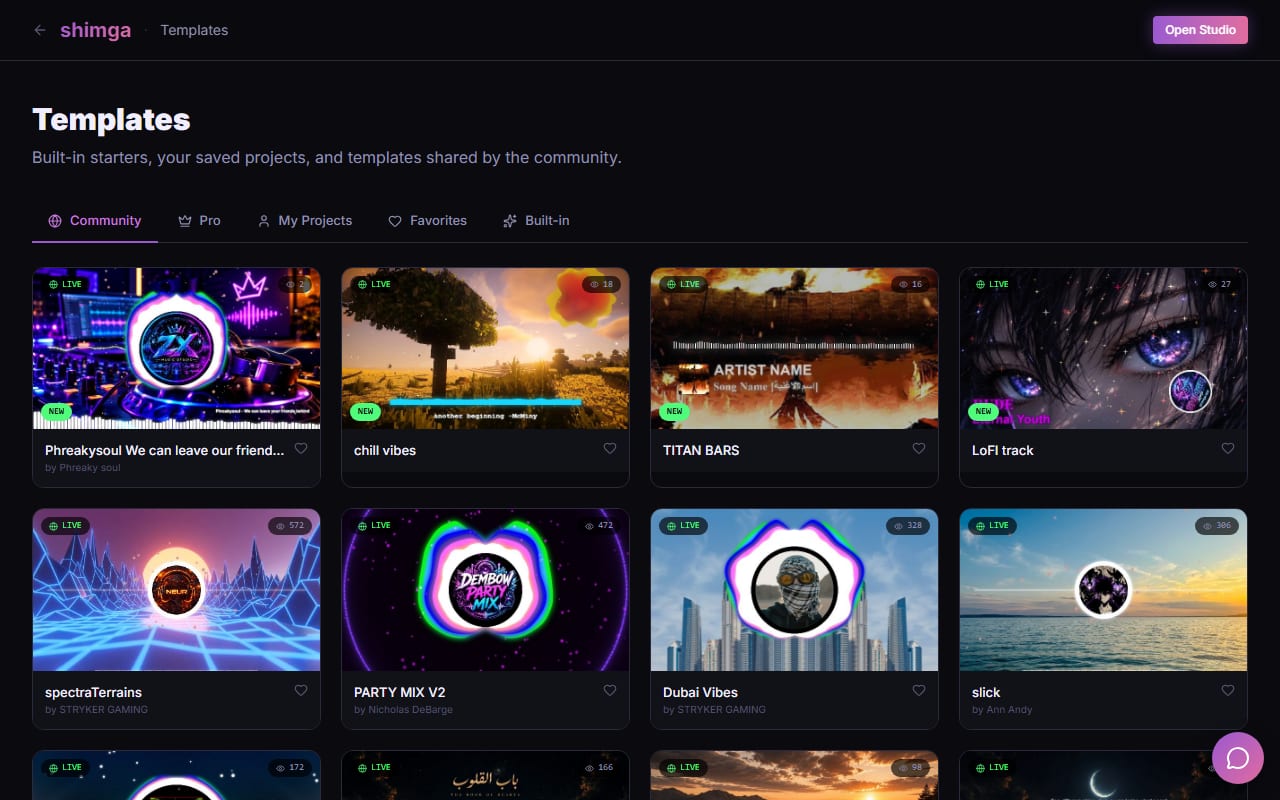
Shimga Studio is a browser-based music visualizer. Here is what it offers today:
- Build, preview and export without paying or signing in. You only sign in to buy or use Pro.
- No watermark: standard exports are currently free as MP4 from 480p to 4K, at 24, 30 or 60 fps, up to 5 minutes, with no Pro elements.
- Canvas shapes: 16:9, 9:16, 1:1, 4:5, 21:9 and custom sizes.
- Pro for more: videos over 5 minutes, the Pro elements and templates, and Brand Kit. Pro costs $5 per month or $48 per year with a 7-day free trial (card required), $3 for 6 Pro exports (valid for a year), or $131 + tax for Lifetime (one payment, no renewals).
- No install: it runs in Chrome, Edge and other modern browsers.
Screenshot: shimga.app
What can you make with it?
- Audio spectrums: circular spectrums, bar ("monster bar") spectrums and waveforms that move with the music.
- Backgrounds: your own image or video, or GPU shader backgrounds that pulse with the bass.
- Particles that burst on beats.
- Your branding: a logo in the middle of the spectrum, text overlays, and synced lyrics from an .lrc file.
- Any format: 16:9 for YouTube, 9:16 for TikTok, Reels and Shorts, 1:1 or 4:5 for Instagram posts, 21:9 or a custom size.
Every numeric setting can be linked to the bass, mids, highs or overall level, and you can add keyframes, so you are not stuck with how a template was designed to react. Start from one of the dozens of built-in presets or a community template, then change anything.
How does Shimga render?
Shimga renders on your own computer, frame by frame, straight from the audio file. There is no render queue, and the visuals cannot drift out of sync because every frame is calculated from the exact moment of audio it belongs to. Render time depends on your hardware and the resolution you choose; on a typical machine a 1080p export takes roughly as long as the song. Chrome and Edge work best for long videos. Your audio stays on your device.
What is a quick workflow?
- Open Shimga Studio and add your song.
- Choose a preset or template.
- Swap the background for your cover art and add your logo or artist name.
- Decide what reacts to what, for example background pulse on the bass and particles on the highs.
- Pick a resolution, frame rate and aspect ratio, then export.
Photo: Alina Vilchenko on Pexels
What should you set up first for a release?
Whichever tool you use, a few choices decide how good the finished video looks:
- Artwork: use a large, sharp cover image. A 3000 by 3000 pixel cover stays crisp when scaled to fill a 1080p or vertical frame.
- Reactivity: let the bass drive one obvious element (a pulse, a glow) and the highs drive a finer one (particles, small bars). A scene where everything moves to everything looks busy.
- Branding: keep your logo or artist name in a consistent spot across releases so viewers recognise your videos.
- Safe areas: on 9:16 videos, apps cover the bottom and right edges, so keep text away from them. See music video aspect ratios.
- Reuse: save a finished scene as a template, so your next release means swapping the song and the artwork.
If you are new to tuning how visuals follow the music, audio frequencies and reactivity explains which frequency range suits which element.
How do Shimga and Vizzy compare at a glance?
Vizzy details below were checked on vizzy.io (its home page and FAQ) on 11 November 2026.
| Feature | Shimga | Vizzy |
|---|---|---|
| Approach | Studio with layers, per-band linking and keyframes | Layer editor with effects and audio analyzer settings |
| Where it renders | On your computer, in the browser | On your computer, in the browser (WebAssembly or WebCodecs encoder) |
| Cost | Standard exports currently free; Pro $5/month or $48/year (7-day free trial), $3 for 6 Pro exports, or $131 + tax Lifetime | Free; funded by ads and donations |
| Watermark | None | None ("No watermarks") |
| Resolution and frame rate | Up to 4K and 60 fps, currently free for scenes without Pro features | "Up to 4K", "Up to 60 FPS" |
| Canvas shapes | 16:9, 9:16, 1:1, 4:5, 21:9 and custom sizes | Square, vertical and custom resolutions |
| Length | Up to 5 minutes free; longer needs Pro | No length cap stated; WebAssembly exports are limited to 4 GB (2 GB without the File System API) |
| Sign-in to export | No (only for Pro) | Check vizzy.io |
| Export format | MP4 (H.264 and AAC) | MP4 |
| Audio formats | MP3, WAV, OGG, FLAC, M4A | Check vizzy.io |
Shimga vs Vizzy: how do you choose?
| If you want... | Look at |
|---|---|
| Fine control over how each element reacts to bass, mids and highs | Shimga |
| A tool that is free with no paid plan at all | Vizzy |
| Audio that stays on your device | Shimga |
| Vizzy's specific template library and workflow | Vizzy |
| Rendering that does not use your own computer | A cloud tool such as Specterr (both Shimga and Vizzy render in your browser) |
For prices side by side, read is Vizzy or Specterr free? Pricing compared.
Frequently asked questions
Is Vizzy free?
Yes. As of 11 November 2026, vizzy.io says you can make as many videos as you want, with no watermark, and that the site is funded by ads and donations. Check vizzy.io for any changes.
Does Shimga add a watermark?
No. Shimga does not add a watermark. Standard exports (currently up to 4K at 60 fps, up to 5 minutes, no Pro elements) are free.
Do I need an account?
No. You can build, preview and export a standard video without one. You only sign in to buy or use Pro.
Can I make vertical videos for TikTok and Reels?
Yes. Switch the canvas to 9:16. A vertical export does not need Pro, and 4:5, 21:9 and custom sizes are there too.
Try the Vizzy alternative
Add a song, pick a preset and preview it in your browser.
Open Shimga Studio →Also worth reading: audio visualizers compared and the Specterr alternative.