Soundwave Tattoo Design: Turn Audio Into a Stencil
Soundwave Tattoo Design: Turn Audio Into a Stencil
To design a soundwave tattoo, pick a short recording (about 2 to 5 seconds), draw its waveform as simple black-on-white line art, export it as SVG or a large PNG, and take it to your tattoo artist with the size and placement you have in mind. The Shimga sound wave art editor can make that reference file in your browser: the "Minimal line" layout gives a black line on white, and Mirrored bars give a bold option. Previewing is free; a clean file costs $3.99. Your artist will adapt the design for skin.
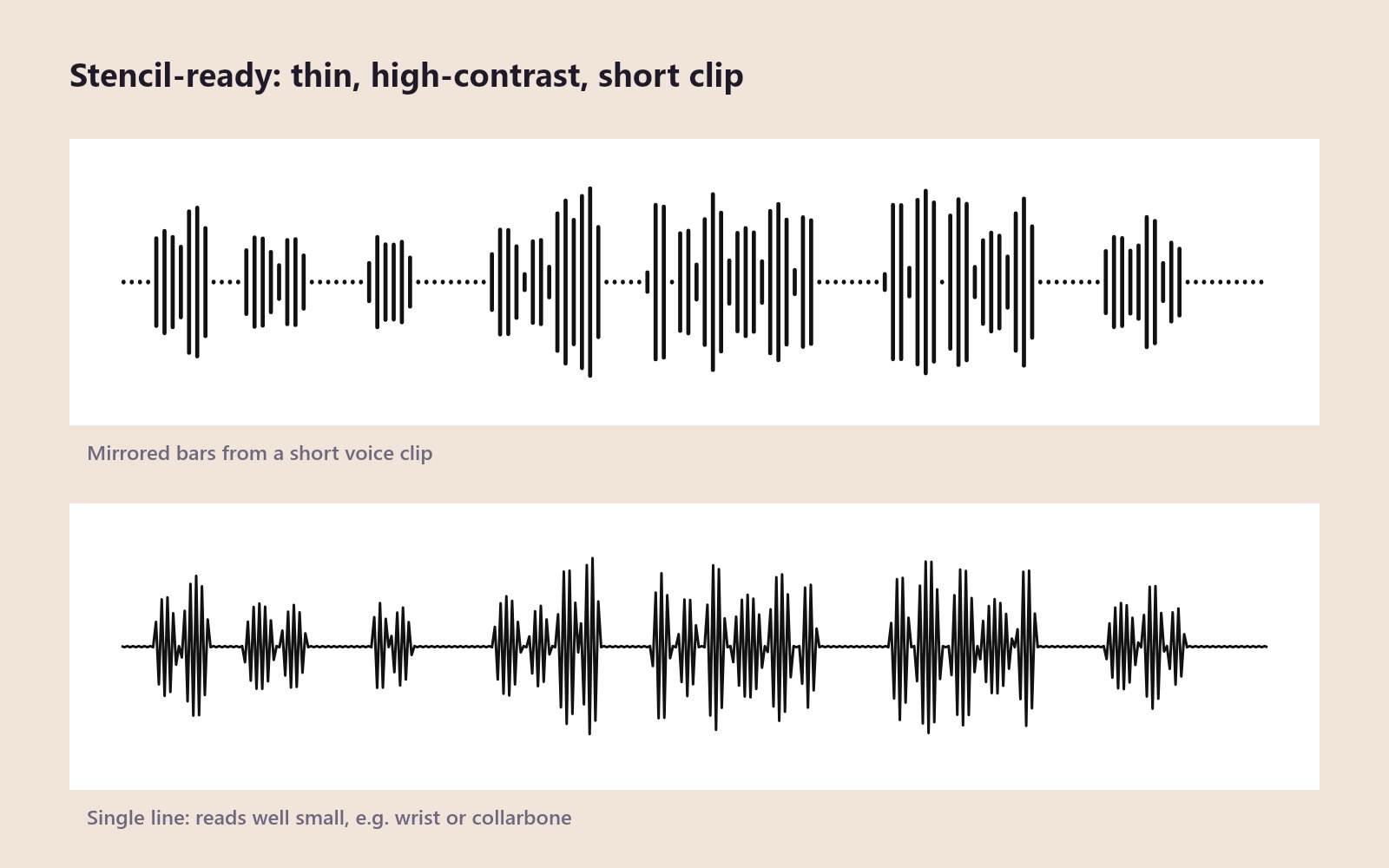 Two stencil-friendly treatments of the same short voice clip. Diagram rendered from an example recording.
Key facts
- Short clips work best: 2 to 5 seconds gives bold, widely spaced shapes.
- Black on white is the clearest reference for a stencil.
- SVG scales to any size without blurring; ideal for your artist.
- Spacing matters: gaps at least as wide as the bars help the design age well.
- Privacy: Shimga reads the audio in your browser; it is not uploaded.
- This is a design reference, not medical or tattoo advice. Your artist has the final say on what will work on skin.
Choose audio with meaning and a good shape
- A voice saying a few words: a name, "I love you", a parent's catchphrase. Words make peaks with clear gaps.
- A heartbeat: a regular double pulse that reads well even when small. See the baby heartbeat guide.
- A laugh: a lively burst anyone who knew the person will recognise.
- A song hook: the first line of a chorus. See how to get the soundwave of a song.
- A memorial recording: a sentence from a voicemail. Back up the file first, and see the memorial guide.
Long recordings turn into a dense, fine pattern that blurs over the years. Shorter is better.
Make the waveform in Shimga, step by step
- Open the editor and Upload or Record your clip.
- Drag Start and End to the exact seconds, with a hair of silence at each end. Use Play segment to check.
- Open Layouts and tap Minimal line for a black line on white, or choose Mirrored or Bars on the Wave tab.
- On Colour, set the wave to solid black and the background to solid white. Avoid gradients and photo backgrounds.
- On Wave, increase Bar width and Gap to reduce the number of bars; raise Smoothing for a cleaner line.
- On Text, clear the title, subtitle and date if you want the wave only, or add one short word to test lettering.
- Export SVG for your artist, plus a large PNG or PDF as a backup. The preview is free; the clean file is paid.
The soundwave tattoo guide has more style examples.
How skin changes the design
Ink spreads slightly over time and tiny gaps close up.
| Factor | What to do |
|---|---|
| Spacing | Keep gaps at least as wide as the bars |
| Line weight | Ask your artist for their minimum comfortable weight |
| Detail vs size | 10 to 15 bars can be small; 60 bars needs length |
| Colour | Solid black reads best; if colour, a few bold shades |
| Text | Needs to be larger than you expect to stay readable |
 Photo: Alireza Heidarpour on Pexels
Line or bars? A quick comparison
| Single line | Mirrored bars | |
|---|---|---|
| Look | Delicate, like a heart monitor | Bold, graphic |
| Small sizes | Works well | Needs fewer, thicker bars |
| Ageing | Can soften; ask about line weight | Gaps can close; keep them wide |
| Best audio | Heartbeat, a single word | A sentence, a laugh, a song hook |
Make both versions in the editor and print them at actual size on paper. Hold each against your skin in the spot you have in mind before you decide.
Placement ideas
- Inner wrist or forearm: the classic horizontal line, like a bracelet.
- Collarbone: a fine single line follows the bone.
- Ribs or side: a longer clip, private placement.
- Ankle or calf: room for a longer wave.
- Behind the ear or on a finger: a very short clip, a few bars.
- Shoulder or upper arm, as a circle: use the Circle or Heart style.
Adding text
A date, a name or a short phrase under the wave is common. Lettering adds fine detail and must be big enough to survive. Ask your artist how small it can go. You can test fonts in the editor (there are 12, from clean sans-serif to script) and send the artist a version with and without text.
A print to match
The tattoo cannot play the audio. Many people keep a framed print of the same waveform at home, made from the same clip. Use the same Start and End points and choose a print size such as 8x10 in. See best sizes for sound wave prints.
What to bring to your artist
- The waveform as SVG and PNG, black on white.
- The recording itself, so they understand the shape.
- A note on size and placement.
- Any text, typed exactly.
- An open mind: the artist may simplify, thicken or space out the bars so it lasts.
Common mistakes
- Too much audio. A 30-second clip becomes a grey smudge on skin.
- Thin gaps. They fill in over time.
- Gradients and dots. Hard to ink and they age poorly.
- Low-resolution screenshots. Export a proper file.
- Skipping the consultation. A good artist will improve the design.
FAQ
How do I turn a voice recording into a tattoo design? Load the recording into a sound wave art generator, select 2 to 5 seconds, set a black wave on a white background with a simple style, and export SVG for your artist.
What is the best style for a soundwave tattoo? A single line or mirrored bars with generous gaps. They read clearly and age better than dots or gradients.
How big should a soundwave tattoo be? It depends on the number of bars and the placement. Your artist can advise, but fewer bars allow a smaller tattoo.
Can a soundwave tattoo play the sound? Not by itself. The Shimga editor does not add QR codes or playback. Keep the recording and a matching print.
Is a heartbeat a good soundwave tattoo? Yes. Its regular pulses are clear and meaningful. See the baby heartbeat guide for getting a recording.
Do I have to pay to get the file? You can design and preview free. A clean, unwatermarked file costs $3.99 per design.
Make your reference
Open the sound wave art generator, load your clip and try the Minimal line layout. For the bigger picture, read the complete guide.
Last updated: October 2026