Trap Nation Style Visualizer and 4 Other EDM Looks
Trap Nation Style Visualizer and 4 Other EDM Looks
A "Trap Nation style" visualizer is a circular audio spectrum that pulses around a centre image, over a background that shakes and glows on the bass. It is one of five looks that EDM promotion channels made famous on YouTube. You can build all five in a browser studio such as Shimga using your own artwork, and export them as MP4 without a watermark.
This post is a style guide: what makes each look work, which genres it suits, and the settings that matter. For a full click-by-click build of the circle look, see our Trap Nation style visualizer tutorial.
Trap Nation, Monstercat and NoCopyrightSounds are named here only to describe well-known visual styles. Shimga is not affiliated with them. Do not use their names, logos or artwork in your video: build the style with your own branding.
 Photo: Divyesh Maheshwari on Pexels
Quick answer
- Trap Nation style: circular spectrum around a logo or cover, bass-driven shake, particles, blurred photo background.
- Monstercat style: a row of flat, thick bars along the bottom with the artist and title in clean type, solid or simple background.
- NCS style: bold geometric or abstract background, centred shape or spectrum, strong single-colour branding.
- Lyric-led style: waveform or thin bars low in the frame, big readable lyrics, slow camera movement.
- 3D scene style: terrain, tunnel or galaxy that moves with the beat; suits melodic and synthwave tracks.
- Fastest route: start from a matching template, swap in your art, export 16:9 for YouTube and 9:16 for Shorts.
The five EDM channel looks compared
| Style | Core element | Best genres | Motion intensity | Hard part |
|---|---|---|---|---|
| Trap Nation style | Circle spectrum + centre image | Trap, dubstep, bass house | High | Keeping the shake from feeling chaotic |
| Monstercat style | Flat bar spectrum along the bottom | EDM, electro house, drum and bass | Medium | Getting bar spacing and smoothing right |
| NCS style | Geometric background + centred visual | Electronic pop, future bass | Medium | Distinctive colour branding |
| Lyric-led | Waveform + large text | Vocal tracks, melodic EDM | Low | Timing lyrics (use an LRC file) |
| 3D scene | Terrain, tunnel, galaxy | Synthwave, melodic techno, ambient | Variable | Performance on slower laptops |
1. The Trap Nation-style circle
What makes it work: the eye locks on the centre image, and the spectrum ring turns every kick into a visible punch. A slight camera shake on the bass and drifting particles add energy without changing the composition.
Settings that matter:
- Ring radius: leave room for the centre image plus a gap, or the bars look glued to the logo.
- Bass sensitivity: let the low end drive the image scale and shake; let highs drive particles.
- Smoothing: too little and the ring flickers; too much and it lags behind the drop.
- Background blur: blur your photo so the ring stays the focus.
 Photo: asim alnamat on Pexels
2. The Monstercat-style bar row
What makes it work: restraint. A single row of thick bars, often in one colour per release, with clean typography for artist and title. It reads instantly on a phone.
Settings that matter: bar count (fewer, wider bars look bolder), a gentle fall-off so bars decay smoothly, and a logarithmic frequency spread so the bass does not fill half the row. Our audio frequency reactivity guide explains why.
3. The NCS-style geometric look
What makes it work: a consistent visual identity. A strong colour, a recognisable shape and a centred visual make every upload look like part of a series. That consistency is the lesson to borrow, not the specific design.
Tip: pick one accent colour and one shape for your channel and keep them across releases. See music visualizer colour theory.
4. The lyric-led visualizer
What makes it work: for vocal tracks, words keep people watching. Keep the spectrum low and quiet, give the lyrics the centre, and use a slow zoom on the background.
5. The 3D scene
What makes it work: movement through space. A terrain or tunnel that speeds up on the drop feels like a journey. These are heavier to render, so export a short test first.
How to build any of these in Shimga
- Open the studio and pick a preset close to the look you want, or browse Templates for community designs. There are 16 new templates to start from.
- Add your song. MP3, WAV, OGG, FLAC or M4A.
- Replace the centre image with your own cover or logo. Never use another channel's logo.
- Tune the reaction: bass to scale and shake, mids to the spectrum, highs to particles.
- Add text: artist and title, and the Time element if you want a progress bar.
- Export: 16:9 at 1080p or 4K for YouTube, then a 9:16 version for Shorts and Reels. Standard exports up to 5 minutes need no account; longer mixes need Pro.
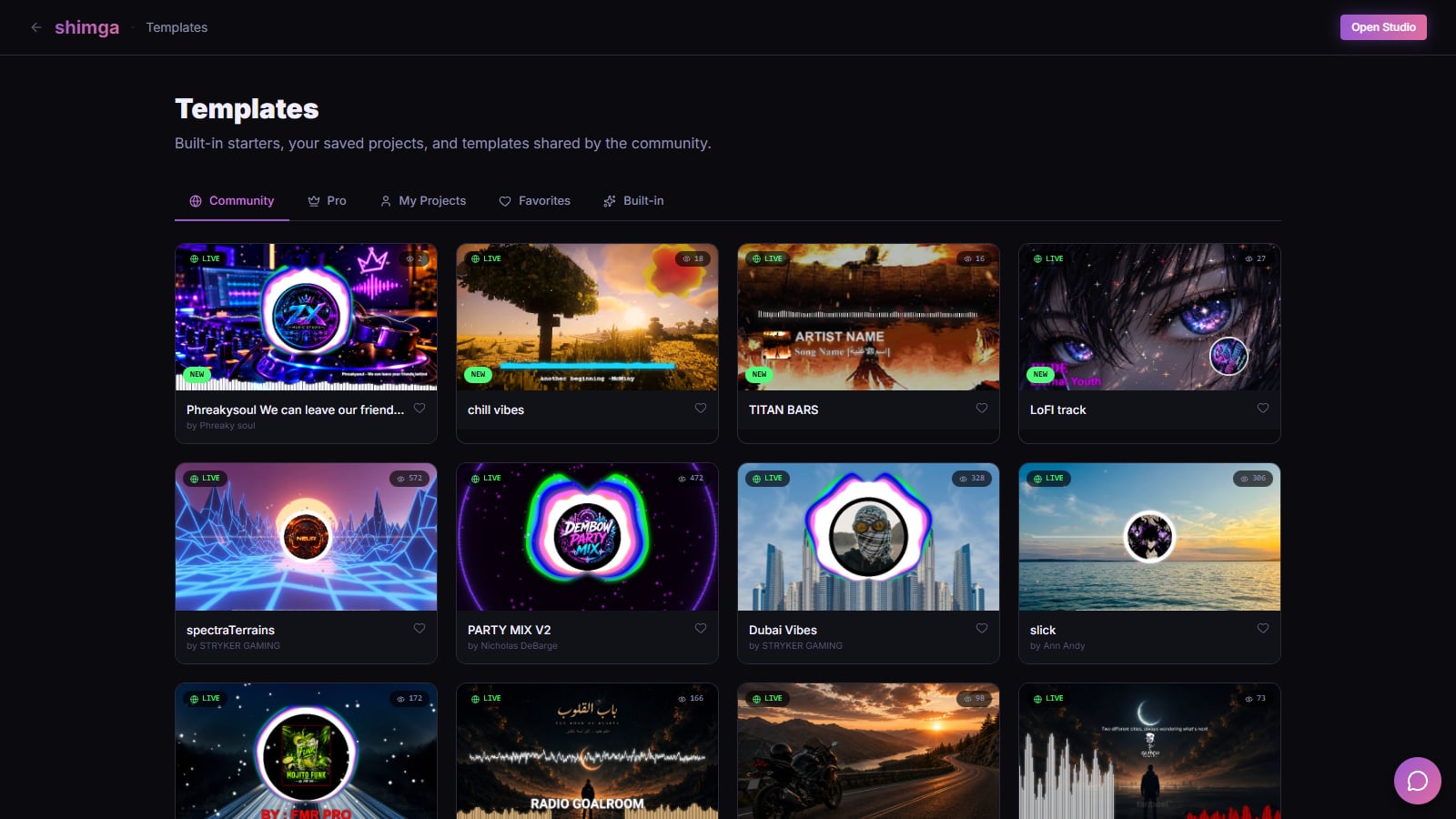 Screenshot: shimga.app/templates, October 2026
Staying on the right side of the line
- Style is not ownership. A circle spectrum is a common technique; a channel's logo, name and artwork are theirs.
- Do not imply endorsement. Avoid titles like "Official Trap Nation upload" unless it is.
- Use music you have rights to. A visualizer does not change copyright on the song.
Common mistakes with EDM-style visualizers
- Everything reacts to everything. If the background, ring, particles and text all jump on every kick, nothing stands out. Give each layer one job.
- Low-resolution centre art. The centre image is the focus; a blurry 500-pixel cover looks worse at 4K. Use the largest version you have.
- Copying a channel's exact layout. Borrow the technique, then change colours, shapes and type until it looks like you.
- Forgetting the vertical cut. A 16:9 design cropped to 9:16 loses the spectrum's edges. Re-centre for vertical before you export.
FAQ
How do I make a Trap Nation style visualizer?
Use a circular audio spectrum around your own cover image, blur a photo for the background, let the bass drive scale and a little shake, and add particles on the highs. Our step-by-step tutorial shows every setting.
What software does Trap Nation use?
We do not know what any specific channel uses, and it may change over time. You can reproduce the general look with a browser studio such as Shimga, After Effects plugins, or FL Studio's ZGameEditor Visualizer.
Can I make a Monstercat style visualizer for free?
Yes. A flat bar spectrum with clean text is one of the simplest looks to build. Shimga exports it free up to 4K/60 fps and 5 minutes with no watermark (as of October 2026).
Can I use the Trap Nation logo in my video?
No. Use your own logo and artwork. Naming a style to describe it is fine; using someone's branding is not.
What is audio reactive visual art?
Graphics whose shape, size, colour or motion are driven by the sound in real time. Read audio reactive visuals explained.
Which style works best for YouTube Shorts?
Bold, centred looks: the circle style and the bar row both survive a small vertical screen. Export a separate 9:16 version rather than cropping.
Related reads
- Trap Nation style visualizer: build the look
- Types of audio visualizers
- Add your logo to a music visualizer
Last updated: October 2026.