YouTube Music Video Maker: Make a Video for Any Song
Update, 20 November 2026: Shimga's free exports now go up to 720p at 30 fps with a small "Made with shimga.app" watermark, and Pro elements and templates are included. 1080p to 4K, 60 fps, exports without the watermark and videos over 5 minutes need Shimga Pro or credits. Where this article mentions free 4K or no watermark, it describes the earlier free tier.
Short answer: To make a YouTube music video without filming, load your track into a browser visualizer, pick a preset that fits the genre, add your cover art or logo, and export a 16:9 MP4 at 1080p. In Shimga Studio you can build, preview and export without signing in or paying; exports up to 5 minutes without Pro elements are currently free up to 4K at 60 fps.
Last updated 21 October 2026.
Why put your music on YouTube with a real video?
A bare audio file or a single static image gives viewers little reason to stay. YouTube rewards watch time and session duration, and moving visuals that react to the music give people something to watch. A 9:16 clip cut from the same track can also reach new listeners through Shorts. Making a visualizer video is the quickest route for artists without a filming budget.
Photo: Zulfugar Karimov on Pexels
What YouTube specs should you export for?
| Setting | Recommendation |
|---|---|
| Aspect ratio | 16:9 for standard uploads; 9:16 for Shorts |
| Resolution | 1080p (1920x1080) is a solid default; 2K or 4K gives YouTube more detail to work with and is currently free in Shimga |
| Format | MP4, H.264 video, AAC audio |
| Frame rate | 30 fps suits most visualizers; 60 fps is currently free in Shimga and mainly helps very fast motion |
| Bitrate | About 12 to 20 Mbps for 1080p so YouTube's re-encode has clean source material |
Use 16:9 for normal uploads; a 1:1 or 9:16 video in a standard slot shows black bars. Shimga supports 16:9, 9:16, 1:1, 4:5, 21:9 and custom sizes, so one project can produce each version. See aspect ratios for music videos.
Which types of music video work without a camera?
- Audio visualizers: spectrums, waveforms or particles that react to the music. Low effort, strong when the preset suits the genre.
- Lyric videos: lyrics synced to the song, which also catches people searching for lyrics. See adding lyrics to a music video.
- Looping visuals: a seamless animated scene under the full track, popular for lo-fi, ambient and study music. See lo-fi music video animation.
- Artwork with an animated intro: cover art with a short logo or title animation.
- Footage plus visualizer: studio or performance clips mixed with an animated section, edited together in a video editor.
Screenshot: shimga.app
Which tools make a YouTube music video?
| Tool | Best for | Note |
|---|---|---|
| Shimga Studio | Music-specific visualizers with per-band audio reactivity | Browser-based; MP4 export; presets and community templates; no sign-in for standard exports |
| Canva | Simple designs and lyric-style videos | General design tool; audio reactivity is basic. Check its current plans. |
| CapCut | Short-form edits and Shorts teasers | Mobile-first; check current export and watermark terms. |
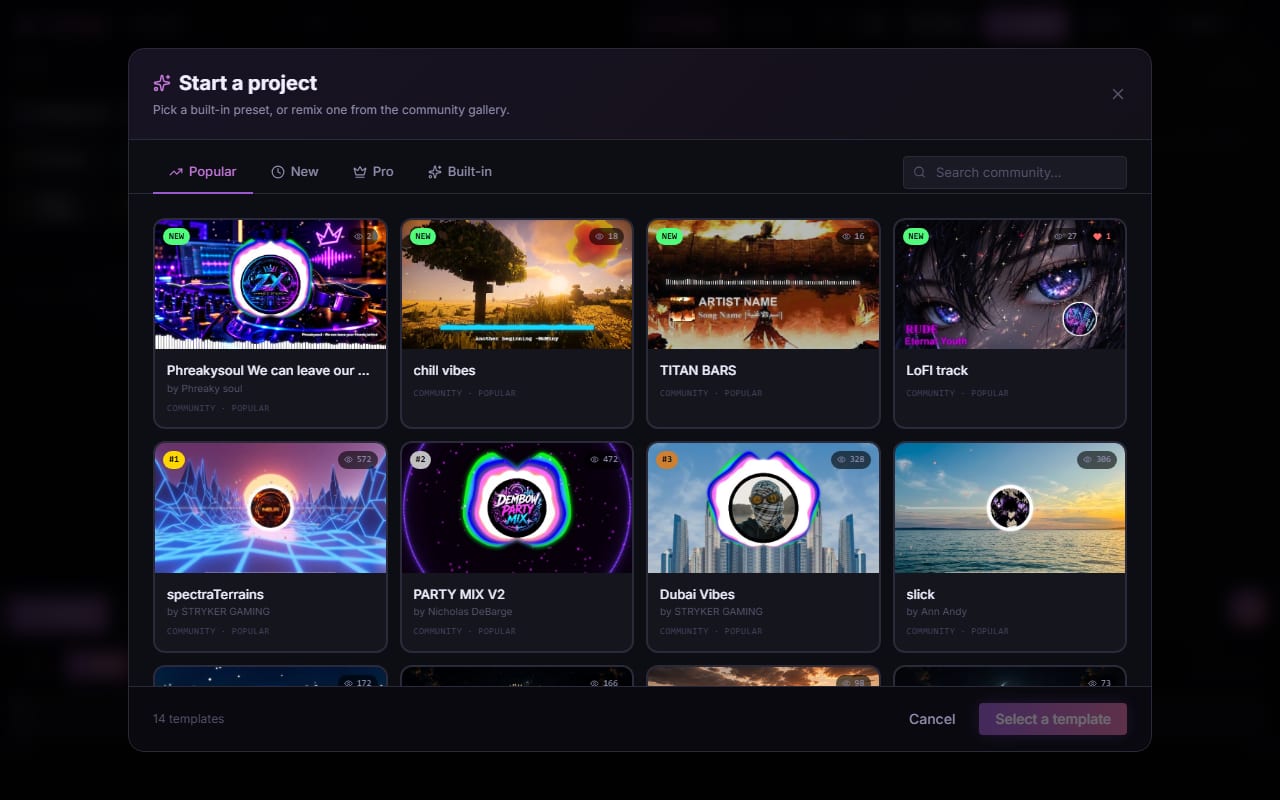
Shimga is built for audio visualization, so presets can respond separately to bass, mids and highs. Browse genre-oriented starting points in the templates gallery.
How do you make a 1080p YouTube music video in Shimga?
- Open Shimga Studio in Chrome or Edge. No download, no sign-in to start.
- Drop your MP3, WAV, OGG, FLAC or M4A file onto the studio. The visualizer reacts to your track straight away.
- Pick a preset and preview it against the audio. Electronic tracks often suit circular spectrums, lo-fi suits gentle waveforms over a photo, hip-hop suits bass-reactive bars.
- Customise colours and background. Use your cover art, an image or a video.
- Add your logo or artist name with the logo and text layers.
- Set the canvas to 16:9, then in Export choose 1080p and 30 fps.
- Export the MP4. Rendering happens on your device; time depends on your hardware and the length of the track.
Standard layers up to 5 minutes currently export without Pro and without a watermark, at any resolution up to 4K and 24, 30 or 60 fps. Longer videos and Pro layers need Pro: $5 per month or $48 per year with a 7-day free trial (card required), $3 for 6 Pro exports (credits, valid for a year), or $131 + tax for Lifetime (one payment, no renewals). A scene with Pro items can also be exported with the Pro elements removed. More in exporting in 1080p and 4K.
Photo: Alex Fu on Pexels
How do you get more from the upload?
- Make a custom thumbnail. Screenshot a strong frame, such as a chorus or drop, and add the track title in large readable type.
- Add chapters. Timestamps in the description help viewers jump around longer mixes.
- Lead with keywords. Put the track title, artist and genre in the first lines of the description.
- Open strong. Avoid a long fade-in; make the first seconds visually clear.
- Link your catalogue. Use end screens and cards to point to other releases.
- Check the aspect ratio before you upload. Export 16:9 for the main video and 9:16 only for Shorts.
For algorithm background see YouTube's algorithm and music visualizers, and for channel workflows see audio visualizers for YouTubers.
Frequently asked questions
Can I make a YouTube music video without a watermark?
Yes. Shimga does not add a watermark. Standard exports (currently up to 4K, up to 5 minutes, without Pro elements) are free.
What is the best aspect ratio for a YouTube music video?
Use 16:9 (1920x1080) for standard uploads and export a second 9:16 (1080x1920) version for Shorts. Shimga supports both from the same project.
How do I stop YouTube compression from making my visualizer look soft?
Upload a high-bitrate source at 1080p or higher. Clean source files give YouTube's encoder more data to work with, which reduces visible artefacts after re-encoding.
Do I need to sign in to make a video in Shimga?
No. You can build, preview and export a standard MP4 without signing in. You only sign in to buy or use Pro.
Make your YouTube music video
Drop in your track, pick a preset and export a 16:9 MP4.
Open Shimga Studio →See also the YouTube music visualizer page.