4K Music Video Export in the Browser: Guide (2026)
Update, 20 November 2026: Shimga's free exports now go up to 720p at 30 fps with a small "Made with shimga.app" watermark, and Pro elements and templates are included. 1080p to 4K, 60 fps, exports without the watermark and videos over 5 minutes need Shimga Pro or credits. Where this article mentions free 4K or no watermark, it describes the earlier free tier.
Short answer: You can export a 4K (3840x2160) music video entirely in your browser because the WebCodecs API gives web pages direct access to the hardware video encoder. In Shimga Studio, 2K, 4K and 60 fps exports need Pro or credits; free exports go up to 720p at 30 fps with a small watermark. Pro is only needed for Pro elements, Pro templates or videos longer than 5 minutes.
Last updated 21 October 2026.
Not long ago, exporting a 4K music video meant a desktop editor such as Premiere, Resolve or After Effects, a strong GPU and a long wait. Today it can happen in a browser tab. This guide explains why that is possible, how to do it in Shimga, what it requires on the plan side, and which trade-offs to expect before committing to a 2160p render.
Photo: cottonbro studio on Pexels
Why did 4K export used to need desktop software?
Before WebCodecs (Chrome 94 and Edge 94 onward, Safari 16.4 onward), browsers could only write video with MediaRecorder.captureStream(). That API samples whatever is on the canvas in real time. If a visualizer is doing heavy GPU work such as shaders, particle physics or several compositing layers, the page can miss frames while the audio keeps playing at full speed. The result is frozen visuals and drifting sync, which is why browser visualizers historically stopped at 1080p.
What did WebCodecs change?
WebCodecs exposes the device's H.264 encoder directly. Instead of "sample the screen at 30 fps", the page calls videoEncoder.encode(frame, timestamp) for every output frame and receives compressed chunks it can mux into MP4. The browser does this off the main thread, using hardware encoding where available. Duration depends on hardware, resolution and scene; 1080p often takes about as long as the song, and 4K takes longer. See performance tips.
How does Shimga keep every frame in sync with the audio?
- Analyse the audio offline. Before rendering, the track is processed with an OfflineAudioContext and the spectrum and waveform are captured at the exact audio time of every output frame.
- Render deterministically. Frame i always uses snapshot i, never whatever the analyser happened to hold when the main thread woke up.
- Encode with backpressure. The encoder queue is respected so frames are not fed faster than they can be processed, and each frame is timestamped from its index and the frame rate.
- Mux to MP4. No real-time clock is involved anywhere, so the output is identical whether the encode takes 12 seconds or 90.
Screenshot: shimga.app
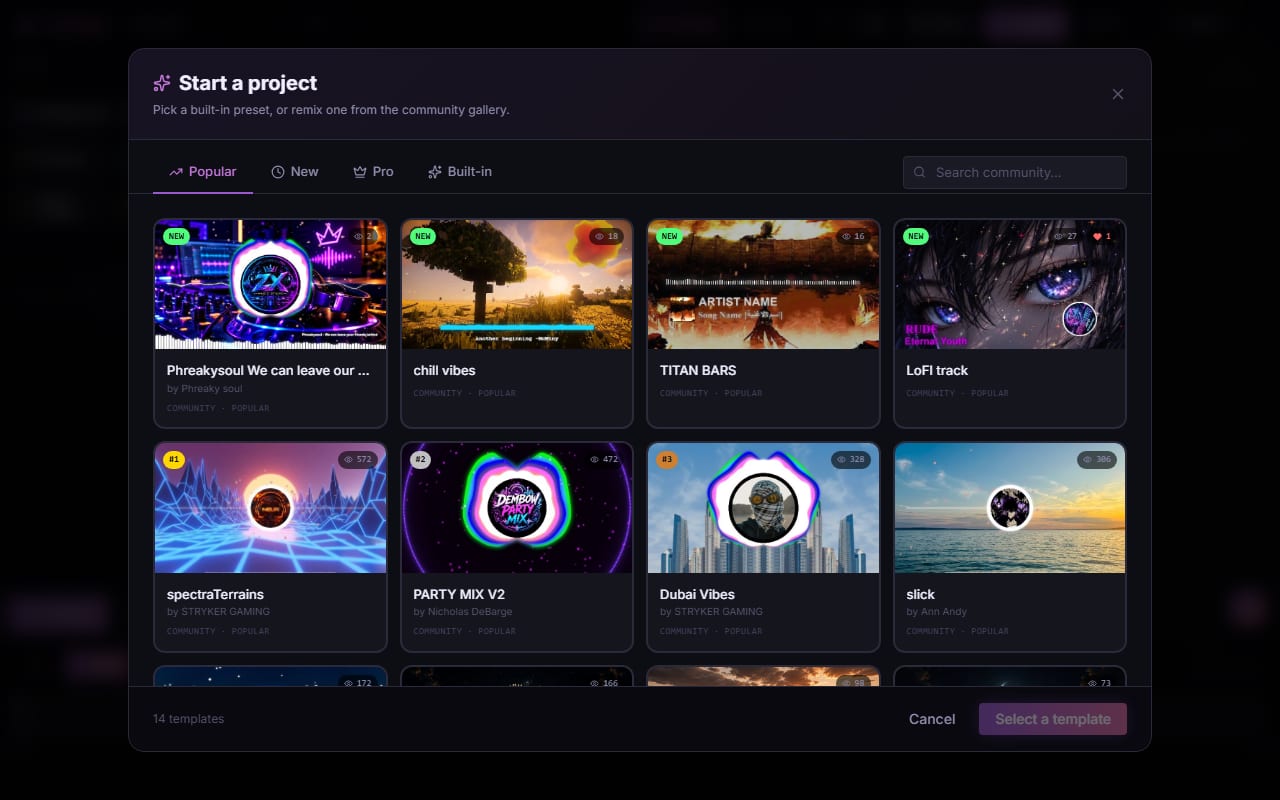
How do you export a 4K music video in Shimga?
- Load your audio in Shimga Studio. MP3, WAV, M4A, FLAC and OGG all work.
- Choose a scene that holds up at high resolution. Crisp vector elements such as bar spectrums and waveforms, or GPU shader backgrounds, scale well. Particle scenes work too, but you may want to increase particle size.
- Open Export and pick 4K (3840x2160). The H.264 profile is selected automatically. Use 30 fps unless you specifically want 24 fps or smooth 60 fps motion.
- Set the bitrate. For 4K, 25 Mbps is a sensible minimum and 40 to 50 Mbps suits archival masters.
- Unlock Pro if prompted. Resolution and frame rate do not need Pro today; Pro elements, Pro templates and videos over 5 minutes do. The editor and preview stay fully usable; the unlock dialog appears when you export.
- Start the export and let it run. The progress bar tracks frames that are actually encoded, so 100% means done.
What does 4K cost in Shimga?
| Export | Needs Pro? |
|---|---|
| 480p to 4K at 24, 30 or 60 fps, up to 5 minutes, standard layers | No |
| 2K (2560x1440) or 4K (3840x2160) | Yes (Pro or credits; free is up to 720p) |
| 60 fps | Yes (Pro or credits; free is up to 720p) |
| Pro elements or Pro templates | Yes |
| Videos longer than 5 minutes | Yes |
Pro options: $5 per month or $48 per year with a 7-day free trial (card required, cancel any time before it ends), $3 for 6 Pro exports (credits, valid for a year), or $131 + tax for Lifetime (one payment, no renewals). If you would rather not pay, the scene can be exported with its Pro elements removed. Shimga's free exports carry a small watermark; Pro and credit exports carry none.
What hardware do you need for 4K?
- 4K at 30 fps: a laptop or desktop with a discrete GPU or a recent integrated GPU; Apple Silicon handles it well.
- 4K at 60 fps: a reasonably modern dedicated GPU. Without hardware encoding, expect much longer render times.
- Memory: 8 GB is workable for a few minutes of video; 16 GB is more comfortable if you keep other apps open.
Which bitrate should you choose?
Bitrate is the biggest factor in file size and quality. Approximate sizes for a 3-minute clip:
| Setting | Approx. size | Use |
|---|---|---|
| 1080p at 12 Mbps | 270 MB | Everyday YouTube uploads |
| 1080p at 20 Mbps | 450 MB | HD archive |
| 4K at 30 Mbps | 675 MB | YouTube 4K |
| 4K at 50 Mbps | 1.1 GB | Mastering and screenings |
Going far above 50 Mbps is overkill for music video work, since platforms re-compress anyway. A deeper breakdown is in exporting in 1080p and 4K.
Photo: Moises Caro | Photographer on Pexels
What can browser 4K export not do?
Export is H.264 in an MP4 container with 8-bit colour, so there is no HEVC, AV1 or HDR. Shader layers are rendered at a lower internal resolution and scaled up, which is fine for most music videos but less ideal for very fine detail. If you need 10-bit colour or AV1, use a desktop editor. For most uploads to YouTube, TikTok and Instagram, none of this matters; see free vs paid visualizers for context.
Frequently asked questions
Can I export 4K music videos in the browser?
Yes. Browsers with WebCodecs support, such as current Chrome and Edge, can encode H.264 video directly. In Shimga Studio 4K export needs Pro or credits.
Is 4K export free in Shimga?
Yes, currently. 2K, 4K and 60 fps exports are free today, with no watermark. Pro elements, Pro templates and videos over 5 minutes need Pro.
How much does Shimga Pro cost?
Pro Monthly is $5 per month and Pro Yearly is $48 per year, with a 7-day free trial (card required). Credits are $3 for 6 Pro exports, valid for a year. Lifetime is $131 + tax: one payment, no renewals.
Which bitrate should I use for 4K?
Use at least 25 Mbps for 4K. Around 30 Mbps suits YouTube, and 40 to 50 Mbps suits archival masters.
Does 4K export upload my audio or video to a server?
No. Analysis and encoding run on your own device, and the finished MP4 downloads directly to it.
Export your music video from the browser
Build and preview in the studio, then export at the size you need.
Open Shimga Studio →